How to Run Multiple Agents in One Hermes Agent Window: Subagents, /bg, and Live Sessions
Learn how to install Hermes Agent on macOS, Linux, or Windows, then run parallel subagents, background sessions, and switchable live sessions from a single terminal window, with settings that keep cost, concurrency, and file conflicts under control.
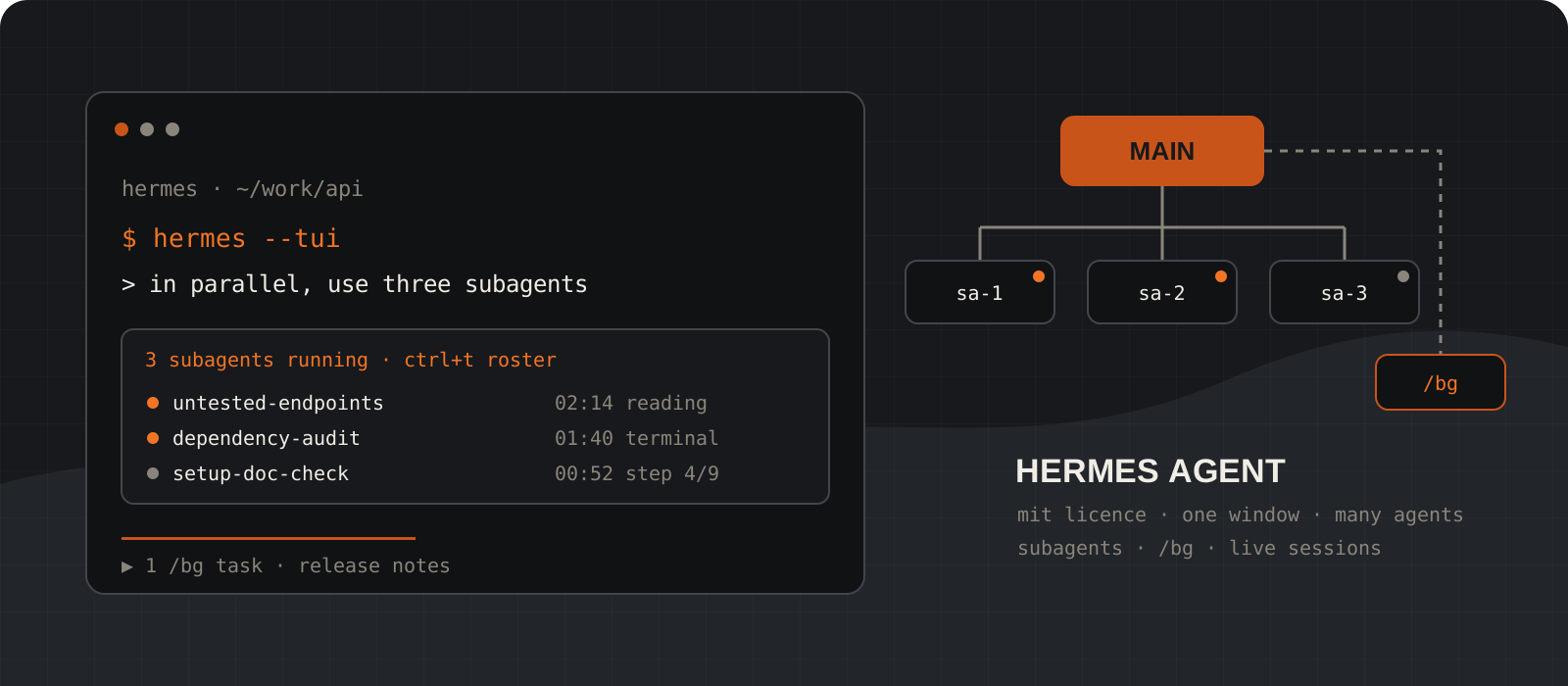
Yes, one Hermes Agent window can run several agents at the same time, and you do not need tmux or a second terminal to do it. Hermes Agent is Nous Research's open-source, MIT-licensed agent with a classic CLI, a full-screen TUI, and a desktop app. It gives you three ways to put more than one agent to work from a single window. Subagents: the main agent calls its delegate_task tool and runs up to 10 child agents in parallel by default, each with its own context and terminal. Background sessions: /bg starts a separate agent on a side task while you keep chatting. Live sessions: the TUI session switcher keeps several full conversations open in one terminal and lets you jump between them. This guide installs Hermes, sets a cheaper worker model so the bill stays predictable, then walks through each mode with prompts, keyboard controls, and config you can copy. Commands were checked against v0.21.3 (tagged v2026.9.14, released 14 September 2026) and the main-branch documentation.
System requirements
Operating system
macOS on Apple Silicon, Windows 10 or 11, Linux, or WSL2
All four are Tier 1 in the official platform support table. Windows runs natively from PowerShell with no WSL needed. The only piece that needs WSL2 is the embedded terminal pane in the web dashboard. Intel Macs are not supported.
Prerequisites
Git. The installer fetches the rest.
On Linux, also have curl and xz-utils. The installer sets up uv, Python 3.11, Node.js, ripgrep, and ffmpeg for you. On Windows it downloads a portable Git if none is on PATH, and it needs no admin rights.
Model
Any model with at least 64,000 tokens of context
Hermes rejects smaller context windows at startup. Hosted options include OpenRouter, Anthropic, OpenAI, Google, and Nous Portal. Local models work through Ollama, llama.cpp, vLLM, or any OpenAI-compatible endpoint.
Cost
Free software, and every agent spends tokens
Hermes is MIT-licensed and needs no account. You pay your model provider. Parallel agents multiply usage, and the docs say subagents typically burn the large majority of a run's tokens, so set a cheaper worker model before your first fan-out (step 03).
Interface
Classic CLI for subagents and /bg, TUI for session switching
The subagent dock, the roster, and /bg work in the classic CLI and the TUI. The live session switcher in step 08 is a TUI feature, started with hermes --tui.
Version checked
v0.21.3 (v2026.9.14)
Hermes has shipped a release every few days in recent weeks. Run hermes update before you follow along, and expect key bindings and defaults to move between releases.
Install Hermes Agent on macOS, Linux, WSL2, or Windows
One installer command per platform. It sets up Python, Node, and the hermes command, then you open a fresh shell.
On macOS, Linux, and WSL2, the install script clones Hermes to ~/.hermes/hermes-agent, links the hermes command into ~/.local/bin, and keeps your config and data in ~/.hermes. On native Windows, the PowerShell installer puts code and data under %LOCALAPPDATA%\hermes and adds hermes to your user PATH.
Reload your shell profile, or open a new terminal on Windows, so the hermes command is found. Then run hermes doctor. It reports anything missing and tells you how to fix each item.
curl -fsSL https://hermes-agent.nousresearch.com/install.sh | bash
source ~/.bashrc   # or: source ~/.zshrc
hermes doctoriex (irm https://hermes-agent.nousresearch.com/install.ps1)
# open a new PowerShell window, then:
hermes doctorhermes updateTip
Piping a script into your shell runs it before you have read it. If that bothers you, download install.sh with curl -fsSLO, read it, then run bash install.sh.
Connect a model and prove one agent works
Fix provider problems with one agent before you add ten more.
hermes model walks you through choosing a provider, signing in or pasting a key, and picking a model. Settings go to config.yaml and secrets to .env, both in your Hermes home. hermes setup runs the full wizard instead, if you want to choose tools and skills in the same pass.
Then start a chat and ask for something small that needs a tool, such as describing the files in the current folder. If that works, delegation will work too, because subagents inherit the parent's provider, credentials, and toolsets unless you override them.
For a local model, choose Custom endpoint and point Hermes at your server. With Ollama the base URL is http://localhost:11434/v1 and the context length must be at least 64000. Ollama's default context is smaller than that, so raise num_ctx for the model first and enter the same number in Hermes.
hermes modelhermes
# then type:
# describe the files in this folder and what the project doesmodel:
default: qwen3.5:27b
provider: custom
base_url: http://localhost:11434/v1Set a cheaper worker model and tighter limits before you fan out
Children do most of the token spending. Pin their model, cap how many run at once, and give each one a time limit.
Delegation settings live in the delegation block of config.yaml. The most useful key is delegation.model. The docs make the case well: splitting a problem needs a strong model, but a subtask that arrives with a clear goal and context usually does not, and the children are where the tokens go. Keep the model you chat with on a frontier model and pin the workers to something cheaper.
The defaults are generous. Up to 10 children run in parallel per batch, each child can take 250 turns, and there is no wall-clock timeout. We start new setups at 3 children, 60 turns, and a 30-minute cap. Those are our starting numbers, not vendor limits. Raise them once you have seen what a real batch costs.
Leave max_spawn_depth at 1. That keeps delegation flat: the main agent spawns workers, and workers cannot spawn their own. Every extra level multiplies how many agents can run at once. Restart Hermes after editing the file so the new values load.
model:
  default: "your-frontier-model"          # the agent you chat with

delegation:
  model: "google/gemini-3-flash-preview"   # worker model, example from the docs
  provider: "openrouter"
  max_concurrent_children: 3              # default 10
  max_iterations: 60                      # default 250 turns per child
  child_timeout_seconds: 1800             # default 0, no limit
  max_spawn_depth: 1                      # default 1, flat
Tip
The general configuration page still lists an older default of 3 children and a depth range of 1 to 3. The delegation page and the source code both say 10 children with no hard ceiling. Set the values explicitly and the mismatch stops mattering.
Decide which tools the workers get
Subagents inherit the parent's toolsets. There is no per-child tool list, so you restrict the parent session.
delegate_task has no toolsets parameter for the model to fill in. That is deliberate: a model cannot hand a child a capability its parent lacks. The flip side is that you cannot give one child web access and deny it the terminal while another child keeps both. Start the session with the tools the whole job needs and nothing more.
Some tools are always removed from children. They cannot ask you clarifying questions, write to memory, send messages to other platforms, or schedule cron jobs. Leaf children, the default role, also cannot delegate further. They keep the terminal, file tools, web tools, and code execution when the parent has them.
hermes chat --toolsets "web,file"hermes chat --toolsets "terminal,file,web"/tools list
/tools disable browserFan out parallel subagents from one prompt
Describe independent pieces of work, with paths and a finish line for each. The main agent decides when to delegate.
Open Hermes in the repository you want worked on and ask for work that splits cleanly. You do not call delegate_task yourself. The main agent does, when the task is complex enough, and it can pass a list of tasks that run in parallel. The call returns a handle right away, so you can keep typing while the children work. By default their results come back as one consolidated message once all of them finish.
The rule that matters most is written in the docs as a warning: subagents know nothing. Each child starts a fresh conversation with only the goal and context the parent writes for it. It does not see your chat history. The one exception is project context files. AGENTS.md, CLAUDE.md, .hermes.md, or .cursorrules in the workspace are embedded automatically. Everything else, including file paths, error messages, commands to run, and what done looks like, has to come from your prompt, because the parent can only pass on what it knows.
Ask for independent work. Children in a batch run at the same time, so if task B needs the output of task A, run A first and ask for B afterwards.
In parallel, use three subagents:

1. Read src/api/ and list every endpoint with no test
   in tests/api/. Output: route, file, line.
2. Run pnpm audit and summarise high and critical
   findings with package, version, and fixed version.
3. Follow docs/setup.md in a scratch directory and
   report every step that fails, with the exact error.

Do not edit files. When all three return, check their
claims, then give me one prioritised list.delegate_task(tasks=[
{"goal": "List API endpoints without tests",
"context": "Routes in src/api/, tests in tests/api/. Read only."},
{"goal": "Summarise high and critical pnpm audit findings",
"context": "Project root is the current directory. Do not upgrade."},
{"goal": "Verify docs/setup.md step by step",
"context": "Use a scratch directory. Report exact errors."}
])Tip
A child's summary is a claim, not proof. Ask the main agent to open the files or rerun the command before it reports back, as the last line of the example prompt does.
Watch, steer, and stop subagents without leaving the window
A live dock above the input box shows every running child. One key opens a roster where you can read, redirect, or stop any of them.
While children run, the classic CLI, the TUI, and the desktop app show a dock above the composer with the live count, task names, elapsed time, and latest activity. You can keep typing underneath it. Press F7 to collapse the dock to a single summary line when it takes too much room.
Press Ctrl+T to open the full roster. In the classic CLI (F6 also works), pick a worker with the arrow keys, press Enter to read its transcript tail, s to send it guidance, and x then y to stop it. In the TUI, Ctrl+T or /agents opens a tree: Enter or t for the live transcript, d for details, e to steer, x to stop one worker, and capital X to stop it and everything under it.
Steering is queued, not instant. The child reads your guidance at its next checkpoint. Stopping one worker leaves its siblings running. /stop, /new, or closing the session cancels every child that session owns, so leave the window open while a batch is in flight.
Both     F7          collapse or expand the dock

Classic  Ctrl+T, F6  open the roster
         Enter       transcript tail
         s           steer the selected worker
         x then y    stop the selected worker

TUI      Ctrl+T      open the roster (or /agents)
         Enter, t    live transcript
         d           details
         e           steer
         x           stop the selected worker
X stop the worker and its subtreeRun side tasks with /bg while you keep chatting
/bg starts a separate agent session in the background. Use it for work that does not need your conversation history.
Type /bg followed by a prompt. Hermes confirms with a task ID and hands your prompt line straight back. The background agent uses the same model, provider, toolsets, and reasoning settings as your session, but it knows nothing about the conversation so far. Write the prompt as if you were briefing someone who just walked in.
You can start several. The status bar shows a ▶ with the number still running, and each result lands as its own panel in the terminal when it finishes. Background sessions are not added to your main conversation history, so copy out anything you need.
/bg and subagents look alike and suit different jobs. Subagents work for the main agent: it writes their briefs, waits for them, and merges their results. /bg works for you: you write the brief, and the main agent never sees the result unless you paste it in. For a quick question about the current conversation that should not derail it, /btw is lighter still. It answers from a snapshot of the transcript and leaves the running turn alone.
/bg Read CHANGELOG.md and the last 30 git commits, then draft release notes for v1.4 grouped into features, fixes, and breaking changes
/bg Search for known issues with Next.js static export on Firebase Hosting and list each one with a source link/btw what retry limit did we agree on earlier?Tip
Older posts and videos mention /background. In current releases the command is /bg, with no longer alias.
Keep several full conversations open with the TUI session switcher
In the TUI, one terminal becomes a dispatcher for several live sessions, each with its own history and, if you like, its own model.
Start Hermes with hermes --tui. Press Ctrl+X or type /sessions to open the switcher, which lists every session live in this TUI process. Select +new, type a prompt, and press Enter to dispatch a new session with that prompt. Press Tab before Enter to choose a model for just that session.
Inside the switcher, Enter jumps to the selected session, Ctrl+N opens a blank one, Ctrl+D closes one, and Esc returns you to where you were. A closed session stays saved and can be reopened later with /resume.
Use this when the parallel pieces are conversations rather than tasks. A frontend session and a database migration session that each need back-and-forth with you belong here. A fan-out of five read-only checks belongs to subagents.
Live sessions opened in the same folder edit the same files. If two of them will change code, give each its own git worktree first, as step 09 shows.
hermes --tui/sessions new
/sessions
# or press Ctrl+Xdisplay:
interface: tuiStop parallel agents from editing the same files
Turn on worktree isolation so each subagent works on its own branch in its own git worktree.
By default every child shares the parent's working directory, and two children editing one file will overwrite each other. Set delegation.worktree_isolation to true and each child starts in <repo>/.worktrees/subagent-<id> on a branch named hermes-subagent/subagent-<id>, created from your current HEAD. Your own checkout stays untouched.
When a child finishes, its result reports the worktree path, branch, commit count, and whether the tree is dirty. A worktree with no commits and a clean tree is removed automatically. Anything holding work is kept for you or the main agent to review and merge.
Isolation only applies inside a git repository on the local terminal backend. In a non-git folder, on Docker, SSH, or Modal backends, or when worktree creation fails, Hermes quietly falls back to the shared workspace. Check git worktree list after the first batch to confirm it took effect.
For editing agents in live sessions, hermes -w starts a session in its own worktree and branch. The docs recommend one hermes -w per terminal for fully parallel editing, which is the one pattern in this guide that goes beyond a single window.
delegation:
worktree_isolation: true # default falsegit worktree list
git branch --list "hermes-subagent/*"
git log main..hermes-subagent/subagent-<id>hermes -wAdd a reviewer agent before you merge
/review sends an independent subagent to check the work your conversation just produced. Its findings come back into the same session.
Run /review on its own, or add a focus. Hermes starts a background reviewer with the full subagent toolset, so it opens the pull request, reads the diff, and runs code instead of judging from a summary. It appears in the dock like any other worker, and its report re-enters your session where the main agent can act on it.
Give the reviewer a strong model even when your workers are cheap. The auxiliary.review setting pins it separately from delegation.model. Without it, the reviewer uses your main model.
/review
/review focus on the database migration and anything that could lose dataauxiliary:
review:
provider: openrouter
model: anthropic/claude-opus-4.6When the team must outlive the window, move to profiles and Kanban
Everything above ends when the session ends. Named profiles and the Kanban board give you durable agents with their own memory.
Subagents and /bg sessions are not durable. Closing the session, /stop, or a process restart cancels or strands them. For work that runs for hours, waits on a human, or should go to a named specialist tomorrow, Hermes has a second model.
A profile is a fully separate Hermes agent with its own config, keys, memory, sessions, and skills. The Kanban board is a task queue shared by every profile on the machine, and a dispatcher inside the Hermes gateway starts each worker as its own hermes -p process. The docs put the difference in one line: delegate_task is a function call, and Kanban is a work queue.
You can still drive the board from one chat window, because every hermes kanban command also works as /kanban inside a session. One rule from the profiles guide: never point two running agents at the same profile. Both write memory, and each loads the other's writes at startup.
hermes profile create researcher --description "Reads source code and external docs, writes findings."
hermes profile create writer
hermes -p researcher setuphermes kanban init
hermes gateway starthermes kanban create "research AI funding landscape" --assignee researcher
hermes kanban watch/kanban create "write launch post" --assignee writer
/kanban listhermes kanban swarm "Design a multi-region failover plan" \
--workers researcher,architect,sre \
--verifier reviewer --synthesizer writerWhich Hermes multi-agent mode should I use?
| Mode | Use it when |
|---|---|
| Subagents (delegate_task) | Several bounded tasks should run in parallel and merge into one answer. Isolated context, inherited tools, cancelled with the session. |
| /bg background session | A side job does not need the current conversation, and you will read the result yourself. |
| /btw side question | You want a quick answer about the current conversation without interrupting the running turn. |
| TUI live sessions | You are holding several conversations that each need your input, possibly on different models. |
| /review | The conversation produced a diff, pull request, or document and you want an independent check before it ships. |
| /moa (Mixture of Agents) | One hard turn deserves advice from several models, with a single aggregator model acting on it. More model calls for one answer. |
| hermes -w in separate terminals | Several agents will edit the same repository at once and each should get its own branch. |
| Profiles and Kanban | Work must survive restarts, move between named specialists, or wait for a human to unblock it. |
Pick by what the parallel work looks like, not by which feature sounds most powerful. Most people need subagents first and the rest later.
Does it work offline with local models?
Yes, if you run a local model server. Hermes runs on your machine, and pointing it at Ollama, llama.cpp, vLLM, or another OpenAI-compatible endpoint keeps inference local. Web search and any hosted tools still need the network, and a cloud provider is never private local inference.
Parallel agents are harder on local hardware. Every child sends requests to the same server at once, and each active session needs the 64,000-token minimum. The llama.cpp section of the providers guide shows the trap: -c 64000 with -np 4 splits the context across four slots and leaves each slot 16k, below what Hermes accepts. On a single consumer GPU we would start with max_concurrent_children at 2 and raise it only while responses stay usable. That is our recommendation, not a documented limit.
What does running several agents cost?
The software is free. Tokens are not, and they scale with the number of agents. Each child is a full agent loop with its own system prompt, tool schemas, and up to max_iterations turns, so ten children can cost about as much as ten separate runs. Nested delegation multiplies again: three levels with three children each puts 27 workers at the bottom.
Three settings control most of the bill: delegation.model for a cheaper worker model, max_concurrent_children for how many run at once, and max_iterations for how long each one may run. Type /usage in a session to see tokens and estimated cost so far.
The trade-offs worth knowing
- Subagents cannot ask you anything. The clarify tool is removed from children, so a vague brief comes back as a confident guess. Give every task a finish line.
- Children share no context with you or with each other. Anything they need must be in the brief or in a project context file such as AGENTS.md.
- Parallel children share one working directory unless worktree isolation is on, and isolation silently falls back outside a local git repository.
- Nothing in one window is durable. /stop, /new, closing the terminal, or a crash cancels children and background sessions. Use profiles and Kanban, or a cron job, for work that must finish.
- The worker model pin is global. Every child in a session uses delegation.model, with no per-task model. The Kanban board supports a model per card if you need that.
- Default limits are loose: 10 children, 250 turns each, and no timeout. Tighten them before the first real run.
- Documentation and code disagree in places. The general configuration page lists older delegation defaults than the source code. When a number matters, set it yourself.
- The project moves quickly. Key bindings, defaults, and commands here were checked against v0.21.3 and the main-branch docs on 15 September 2026.
Our verdict
Start with subagents. They are the feature that turns one Hermes window into a small team, and the dock with its Ctrl+T roster makes a running batch easy to follow and correct. Before the first fan-out, pin a cheaper worker model, drop concurrency to 3, add a timeout, and turn on worktree isolation in any repository where children will write code.
Add /bg when you notice yourself waiting on side jobs, and the TUI switcher when you are keeping two or three conversations in your head at once. Leave Kanban alone until something has to survive a restart. For a single focused task, one agent with a clear prompt is still faster and cheaper than a team.
Use subagents first, with a cheaper worker model, 3 parallel children, a timeout, and worktree isolation on. Reach for /bg and the TUI switcher when you are juggling side work, and move to profiles and Kanban only when the work has to outlive the window.
Frequently asked questions
Can Hermes Agent run multiple agents at the same time?+
Yes. From one window you can run parallel subagents through the delegate_task tool, 10 at once by default, start separate background sessions with /bg, and keep several live conversations open in the TUI session switcher. Named profiles with the Kanban board add durable multi-agent work across separate processes.
Do I have to tell Hermes to use subagents?+
No. The main agent decides when a task is complex enough to delegate. Asking for work in parallel, with clearly separate parts, makes delegation much more likely, and you can say how many subagents you want.
How many subagents can run in parallel?+
Ten per batch by default, set by delegation.max_concurrent_children. There is no hard ceiling. A batch larger than the limit returns an error instead of being cut short, and every extra child adds to token spend.
What is the difference between /bg and subagents?+
The main agent spawns and briefs subagents, and their results come back to it. You start /bg sessions yourself, they receive only the prompt you type, and their results appear in a terminal panel without joining the main conversation history.
Can subagents use a different model from the main agent?+
Yes. Set delegation.model, and optionally delegation.provider, in config.yaml. The setting applies to every child in the session. For a different model per task, use the Kanban board, which supports a model per card.
Does multi-agent Hermes work on Windows?+
Yes. Hermes runs natively on Windows 10 and 11 from PowerShell, and the docs say everything except the web dashboard's embedded terminal pane works natively. Use WSL2 if you need that pane.
Is Hermes Agent free?+
The software is free and MIT-licensed. You pay your model provider for tokens, and running several agents multiplies that usage. Local models through Ollama or llama.cpp have no per-token cost.