LiteLLM CVE-2026-40217: How a Guardrail Tester Turned Your AI Gateway Into a Root Shell
A sandbox escape in LiteLLM's custom-code guardrail tester let anyone holding the admin key run commands as root in the default Docker image. CISA added it to the KEV catalog on 18 November. How the bytecode trick works, what is and is not confirmed, and how to patch, block, rotate and harden your gateway.
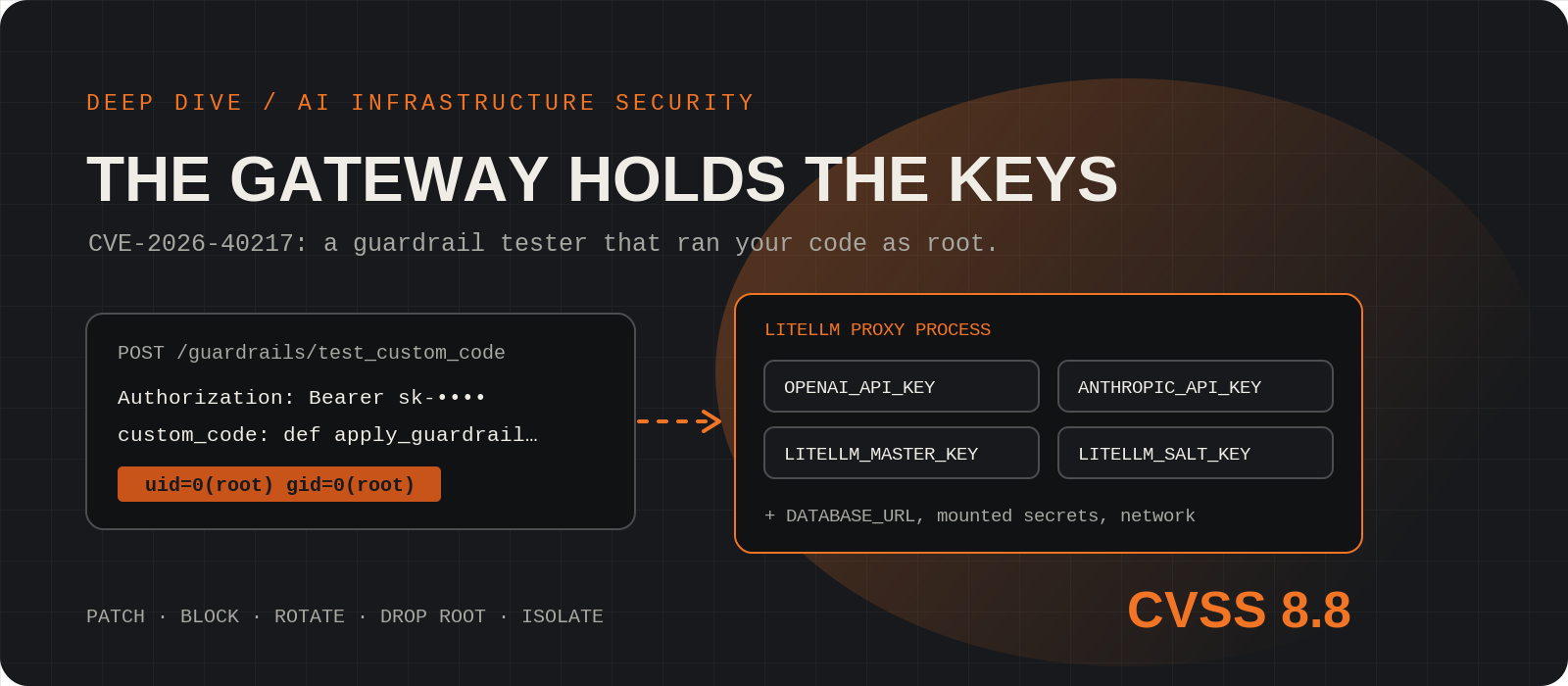
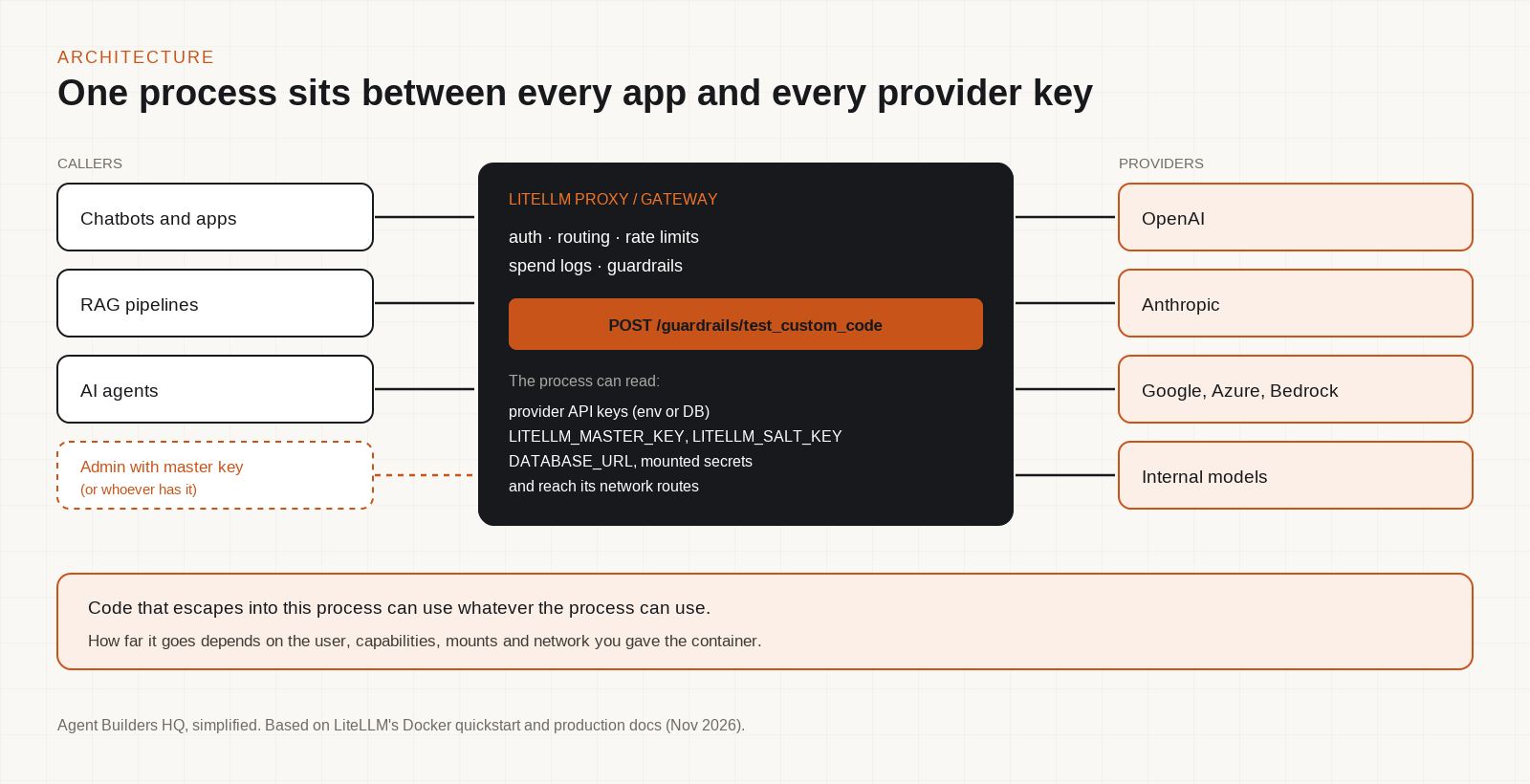
LiteLLM is the gateway a lot of teams put between their apps and every model provider they pay for. That makes it the process that holds the OpenAI, Anthropic and Google keys, the admin master key and the database credentials. CVE-2026-40217 is a sandbox escape in one of its admin endpoints, POST /guardrails/test_custom_code, which runs Python you send it so you can try out a custom guardrail. X41 D-Sec showed in April that the sandbox's regex filter could be walked around by rewriting a function's bytecode at runtime, ending in a shell command that came back as uid=0(root) in the default Docker image. On 18 November 2026 CISA added the CVE to its Known Exploited Vulnerabilities catalog. Reaching the endpoint needs the proxy-admin key in a default setup, so this is not a drive-by attack on every install, but honeypot data shows attackers guessing that key and sending sandbox-escape payloads since the day the fix was merged. This deep dive covers how the escape works, what the sources do and do not confirm, and the patch, block, rotate and hardening steps to do today.
System requirements
Who this is for
Anyone running a LiteLLM proxy, or any LLM gateway
Platform, security and ML engineers who operate LiteLLM in Docker, Kubernetes or a Python environment, and teams building AI agents that route through a shared gateway.
Affected versions
litellm >= 1.81.8 and < 1.83.10, per the GitHub advisory
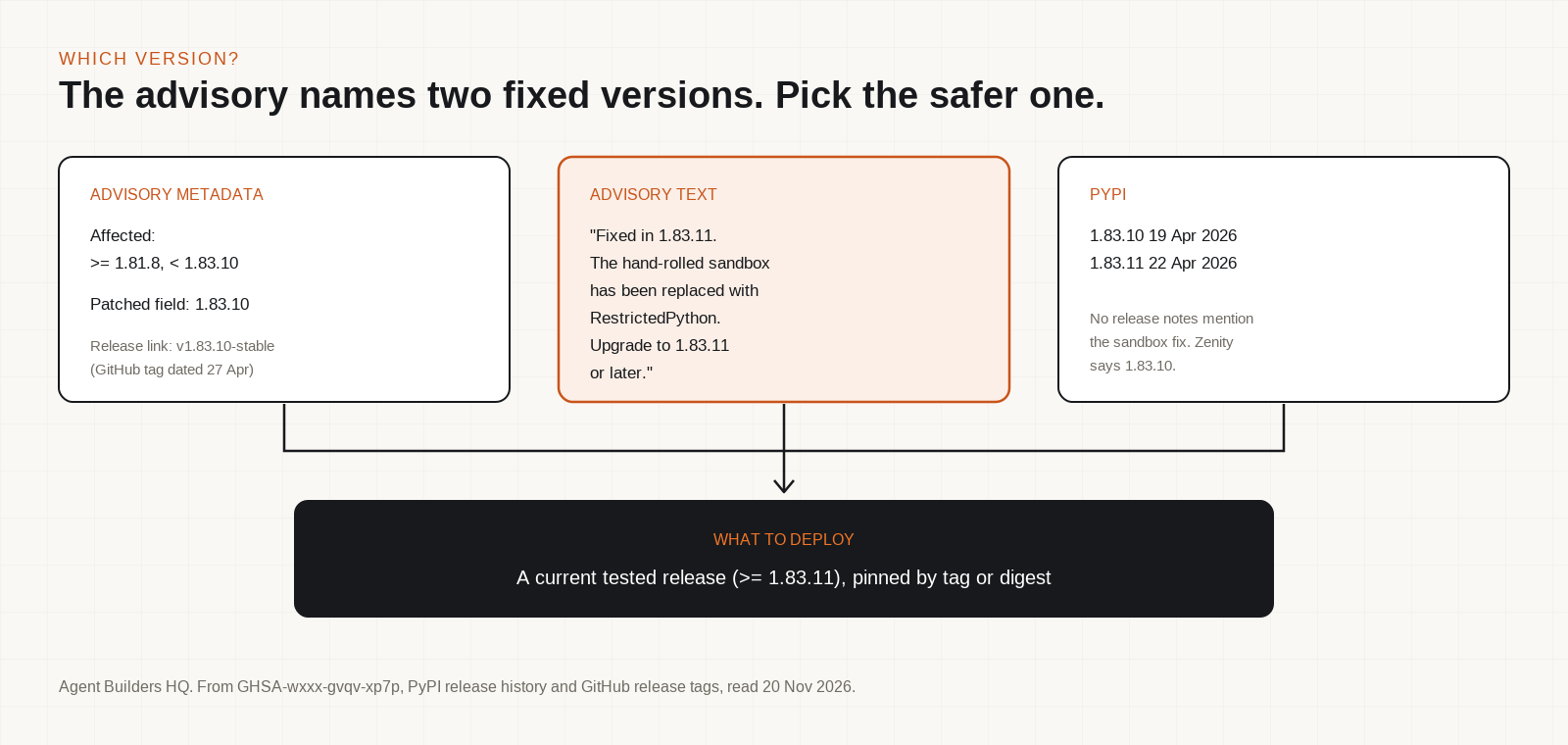
The advisory's written fix says upgrade to 1.83.11 or later. Current releases are well past that, so moving to a current pinned release is the simple answer. Step 07 explains the version mismatch.
Primary sources
X41 D-Sec advisory, GitHub advisory, CVE record, CISA KEV feed, Zenity Labs
X41-2026-001 (8 Apr 2026), GHSA-wxxx-gvqv-xp7p (7 May 2026), the CVE JSON record, CISA's KEV catalog feed (version 2026.11.18) and Zenity Labs' honeypot report (30 Jun 2026). We read all five on 20 November 2026.
Time
About 30 minutes to patch or block, longer to rotate and investigate
Steps 07 and 08 are the urgent part. Rotating keys and checking logs (steps 09 and 11) depends on how many providers and environments sit behind the gateway.
Why the gateway is worth attacking
One process holds every provider key, the admin key and the database credentials.
An LLM gateway gives every app one API to call. LiteLLM then handles authentication, routing, rate limits, spend tracking and guardrails, and forwards the request to OpenAI, Anthropic, Google, Azure, Bedrock or a self-hosted model. You manage the providers in one place instead of in every service.
The price is concentration. LiteLLM's Docker quickstart describes LITELLM_MASTER_KEY as the key that "authorizes every management API call and serves as the default Admin UI password", and LITELLM_SALT_KEY as the key that "encrypts the provider API keys you add in the UI". Provider keys either sit in the process's environment or in its database, encrypted with a salt key the same process holds. Code that runs inside the proxy can therefore read, or decrypt, everything the gateway uses.
That is why a bug in a testing endpoint matters more here than it would in an ordinary web app. Treat the gateway as privileged infrastructure, alongside your identity provider and CI system, not as one more microservice.
What CVE-2026-40217 is
A sandbox escape in the custom-code guardrail tester that gives code execution in the proxy process.
LiteLLM lets admins write custom guardrails, small Python-like functions named apply_guardrail that inspect or block model inputs and outputs. LiteLLM's documentation says this code "runs in a sandboxed environment" with no imports, no file I/O and no exec() or eval(), and only LiteLLM-provided helpers such as http_get. The endpoint POST /guardrails/test_custom_code takes that code plus a test input and runs it, so you can check a guardrail before saving it.
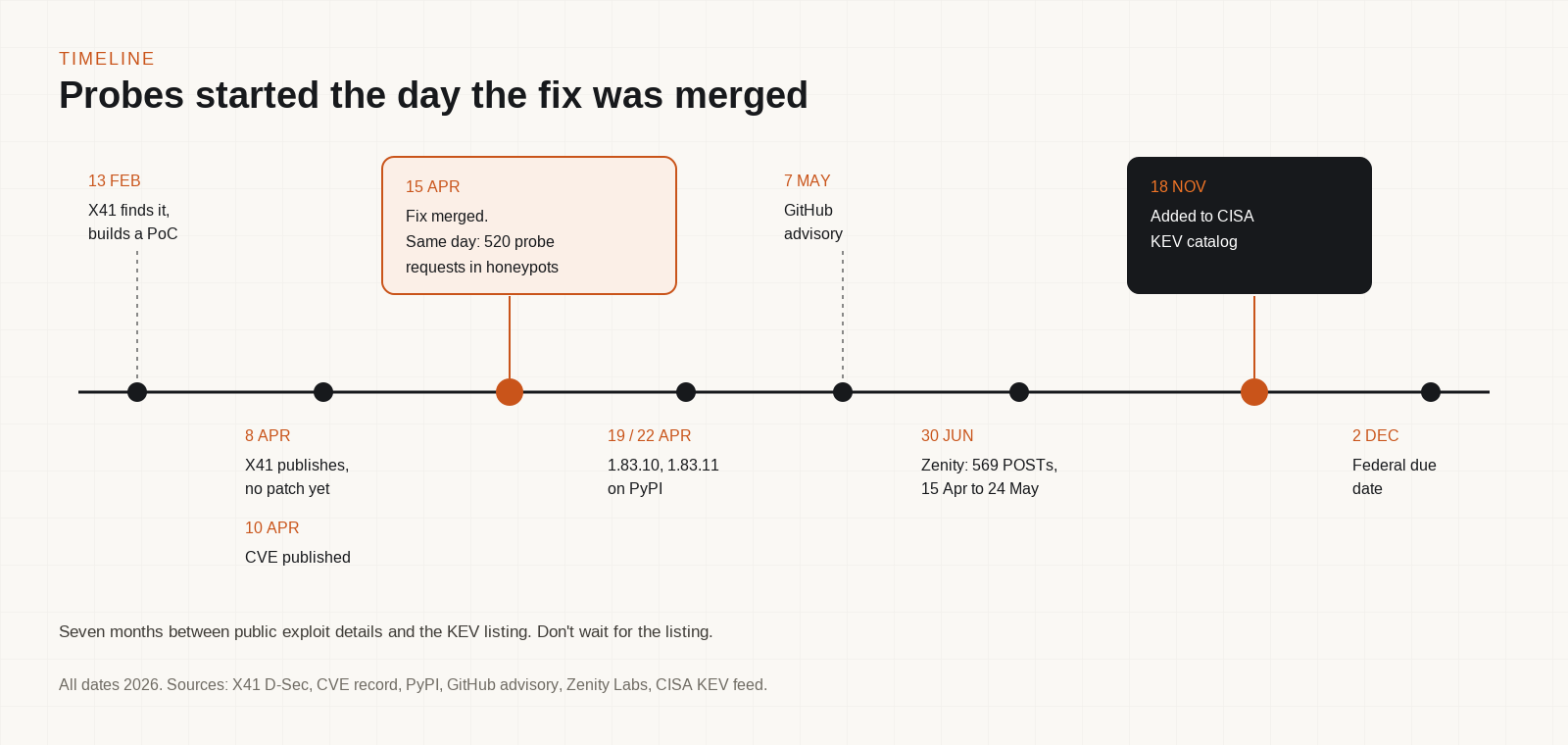
X41 D-Sec reported in February that the sandbox could be escaped, and published advisory X41-2026-001 on 8 April 2026 when the disclosure embargo ran out, with no patch available. The CVE record was published on 10 April. Its description: "LiteLLM through 2026-04-08 allows remote attackers to execute arbitrary code via bytecode rewriting at the /guardrails/test_custom_code URI." GitHub's reviewed advisory followed on 7 May and calls it "a sandbox escape in custom-code guardrail".
The bug class is labelled differently by each source: CWE-420 (unprotected alternate channel) in the CVE record and CISA's catalog, CWE-420 and CWE-913 in the GitHub advisory, and CWE-94 (code injection) from X41 and Red Hat. They describe the same thing. Untrusted code was meant to stay in a box, and there was another way out.
How the sandbox escape works
The filter checked the source text. The attack rewrote what the compiled code looks up.
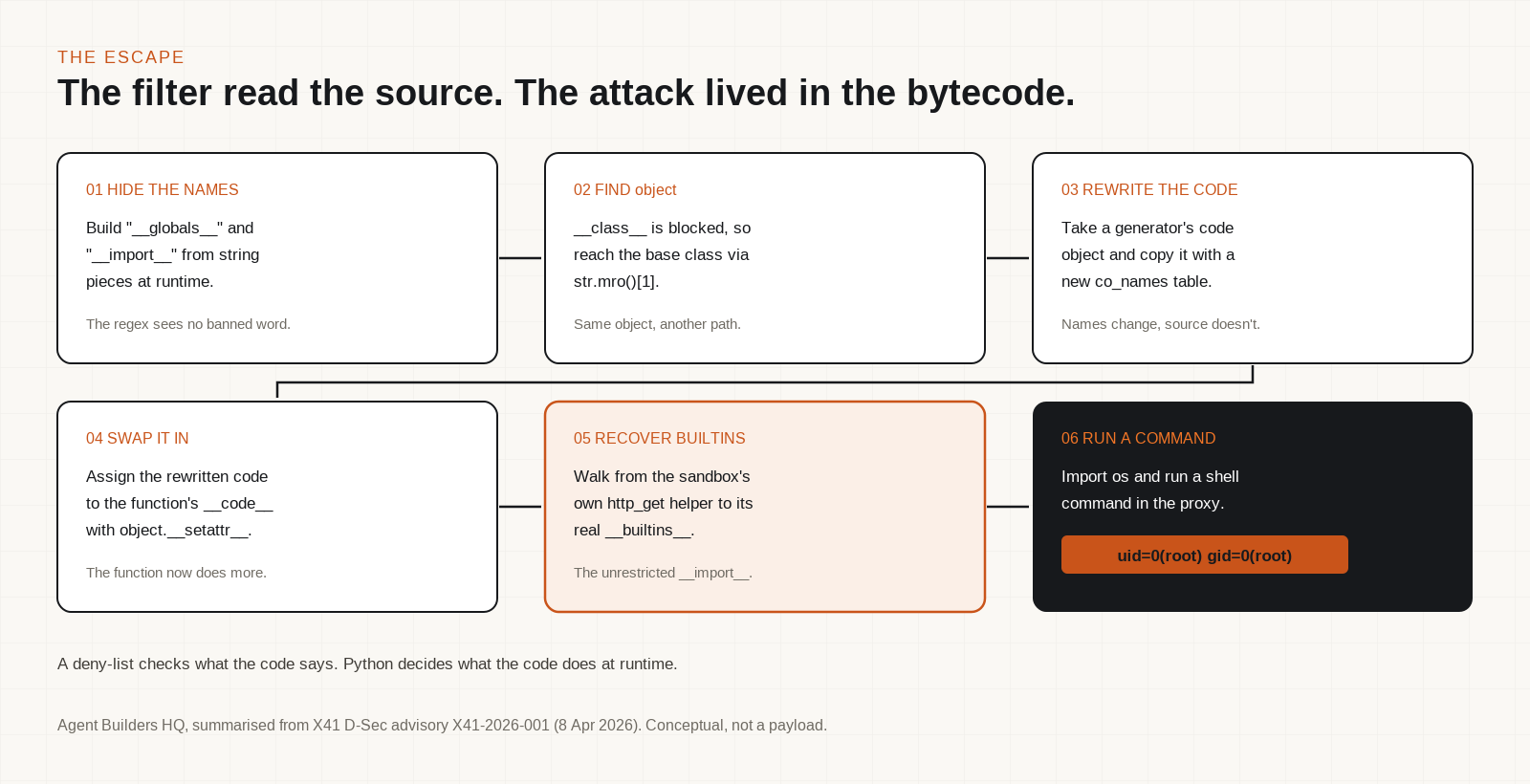
The original sandbox screened submitted code with regular expressions for dangerous names such as __globals__, __builtins__ and __import__, and ran it with a restricted set of builtins. X41's advisory walks through six steps that get past it.
First, the banned names never appear in the source: they are assembled from string fragments at runtime, so a literal regex match finds nothing. Second, because __class__ is blocked, the payload reaches Python's base object class another way, through str.mro()[1]. Third, it takes a generator's code object and uses code.replace(co_names=...) to make a copy whose table of looked-up names is different. Fourth, it uses object.__setattr__ to put that rewritten code object back on the function as its __code__. Fifth, running the modified function walks from http_get, a helper the sandbox deliberately provides, through that function's globals to the real, unrestricted __builtins__ and __import__. Sixth, it imports os and runs a shell command.
The key point is step three. Python source compiles to bytecode, and a code object carries its own list of the names it will look up. The filter inspected what the user typed. After rewriting, the code that actually ran used names the filter never saw. In X41's test against the ghcr.io/berriai/litellm:main-latest image, the command id came back as uid=0(root) gid=0(root).
BANNED = ("__import__", "__globals__", "__builtins__")

def looks_safe(source: str) -> bool:
    # Checks the text the user typed...
    return not any(word in source for word in BANNED)

# ...but this source contains none of the banned words,
# and still produces one at runtime:
src = 'name = "__imp" + "ort__"'
print(looks_safe(src))  # True

# Python then compiles the source to bytecode, and a code object's
# names can be rewritten after compilation. The filter never sees that.Why root in the container matters, and where it stops
Root makes the escape worse, but root in a container is not automatically root on the host.
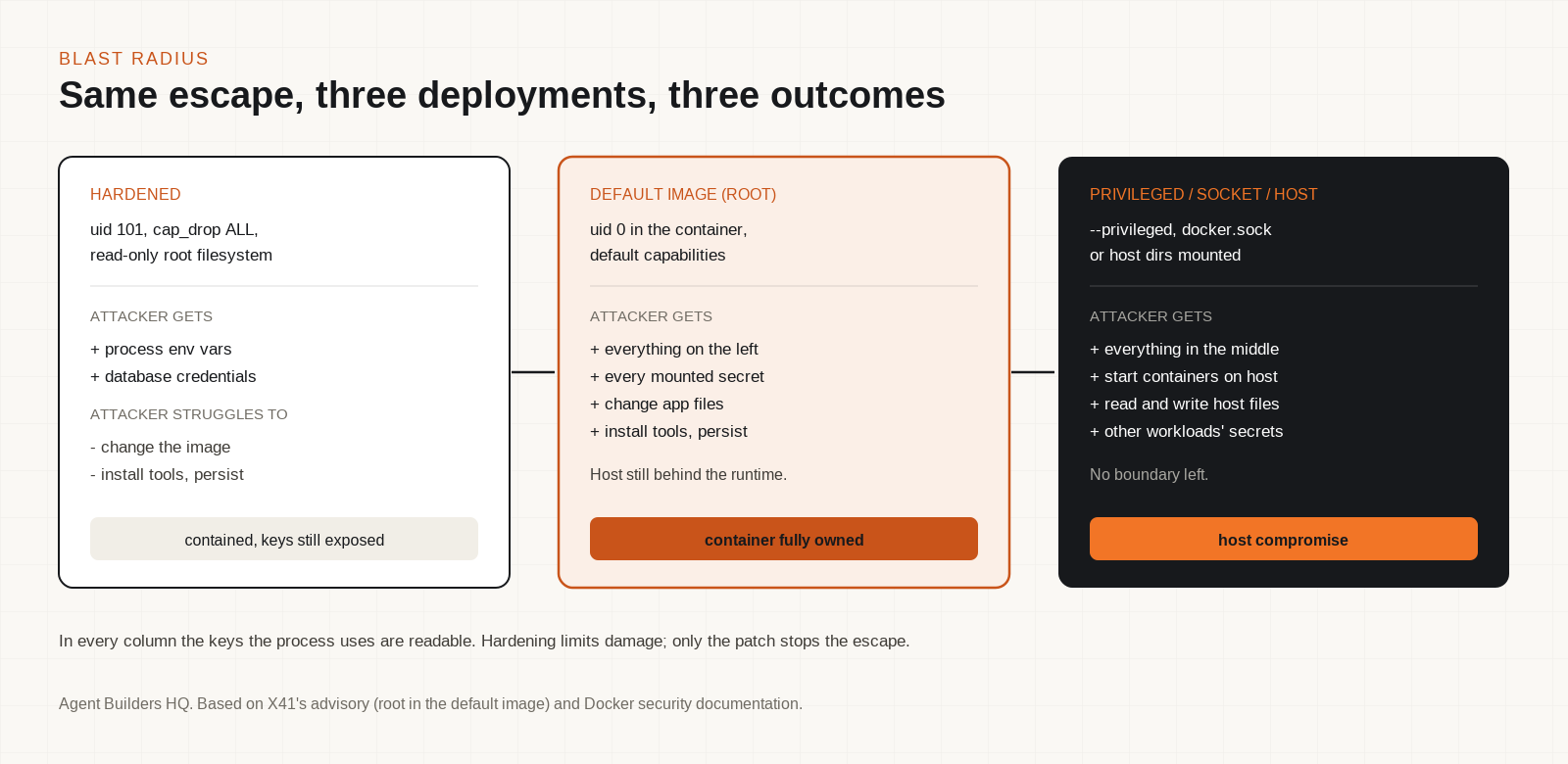
X41's advisory says the default Docker image runs the proxy as root, "maximizing the impact of code execution". From inside that process an attacker can read environment variables and config files, read mounted secrets, query the database the proxy uses, modify application files and open network connections from your infrastructure.
What it does not automatically give is the host. Root inside a container with default capabilities, no host mounts and no Docker socket is a contained problem. Root inside a privileged container, or one with /var/run/docker.sock or host directories mounted, is a host problem. Check which one you are running before you decide how far an incident could have gone.
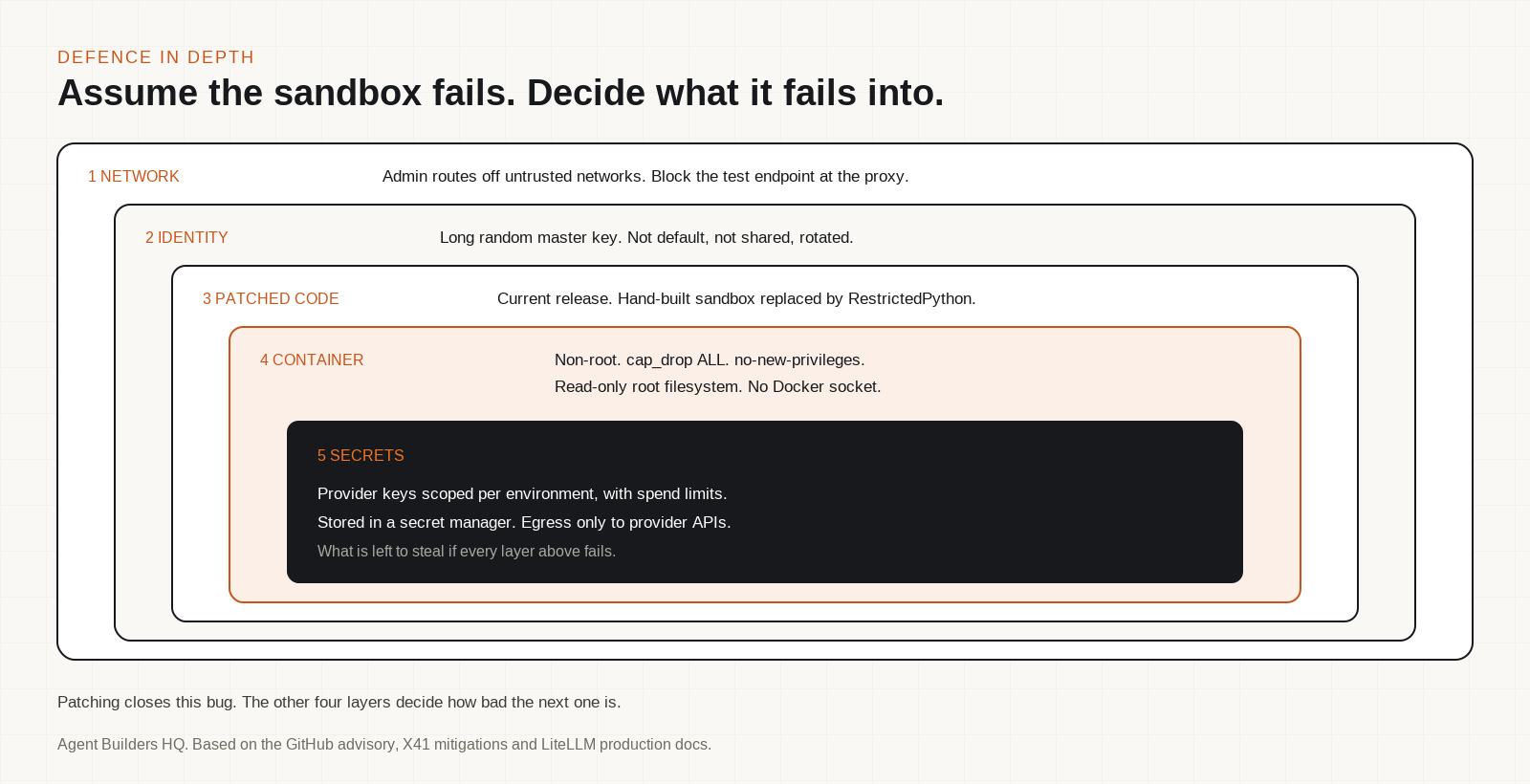
Non-root does not fix the bug either. A non-root process can still read its own environment, which is where the provider keys often live. Non-root, dropped capabilities and a read-only filesystem limit what the attacker can change and how hard it is to persist. They do not protect the secrets the process itself needs.
Who can reach the endpoint
In a default configuration, only a caller with the proxy-admin key. So the real question is who has that key.
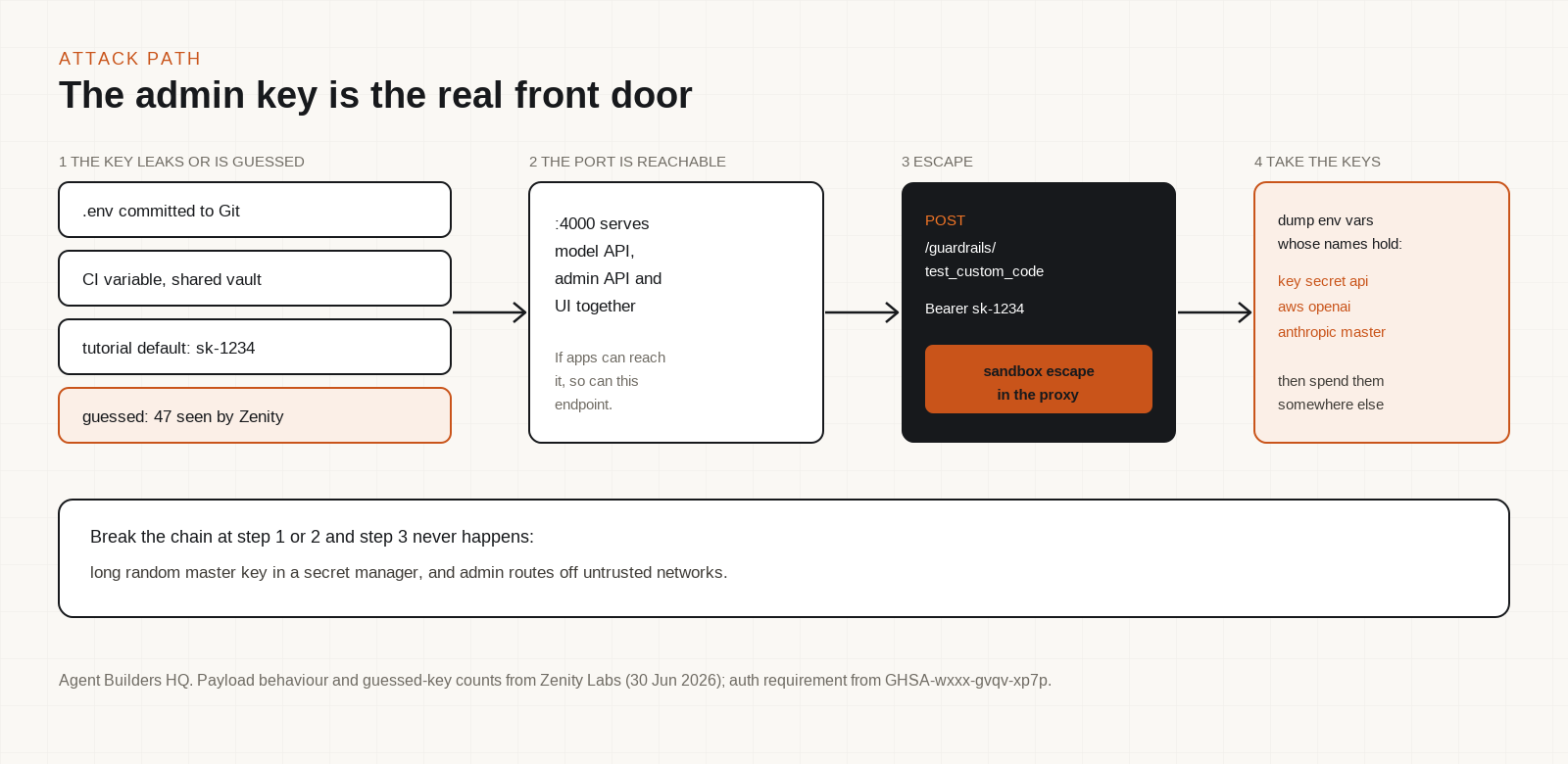
The GitHub advisory is explicit: "Reaching the endpoint requires a proxy-admin credential in default configurations." X41's proof of concept sends the master key as a bearer token. The CVE description says "remote attackers" without mentioning authentication, and CVSS v3.1 rates privileges required as Low. Read that as: a network attacker who holds an admin credential, not any anonymous user.
That still leaves plenty of ways in. Master keys end up in .env files committed to Git, in CI variables, in screenshots and in shared team password vaults. Some deployments keep a default or example key. Zenity's honeypots saw attackers try 47 different guessed keys, including sk-1234, sk-litellm-master-key, sk-admin and sk-changeme, which look like values from tutorials and example configs. If your master key looks like any of those, assume it is known.
The admin UI and management API also tend to be exposed on the same port as the model API. If your gateway's port 4000 is reachable from the internet, so is this endpoint.
Is it being exploited? What the evidence says
CISA lists it as known exploited. Honeypots saw hundreds of attempts. No source confirms a specific victim.
CISA's KEV catalog (feed version 2026.11.18) lists the entry as "BerriAI LiteLLM Unprotected Alternate Channel Vulnerability", added 18 November 2026, due 2 December 2026, with known ransomware campaign use marked "Unknown". Its short description: LiteLLM "could allow remote attackers to execute arbitrary code via bytecode rewriting at the /guardrails/test_custom_code URI." CISA adds a CVE to KEV only when it has evidence of exploitation in the wild.
Zenity Labs published honeypot data on 30 June. Between 15 April and 24 May its sensors recorded 569 POST requests to /guardrails/test_custom_code. 520 of them were identical capability checks on 15 April, the same day the fix was merged, with code that only returned {'probe': 1}. Later payloads included a sandbox escape that dumped environment variables filtered for names containing key, secret, api, aws, openai, anthropic or master, and a command-execution payload. Zenity replayed the payloads in a lab against LiteLLM 1.83.0 and they worked.
What the evidence does not show: that 569 deployments were compromised, that any particular organisation lost keys, or that a ransomware group used this bug. Honeypot hits are attempts against decoys. The accurate summary is that attackers are scanning for exposed gateways, guessing weak admin keys and sending working escape payloads, and that CISA has evidence of real exploitation.
Tip
The 2 December date binds US federal civilian agencies under the directive CISA cites in the entry (BOD 26-04). It is not a legal deadline for private companies or for organisations outside the US. The technical risk is the same everywhere, so use it as your own deadline.
Find your deployments and upgrade
Check every LiteLLM install, then move to a current release pinned by tag or digest.
Find every proxy first: production, staging, the one a team runs on a VM for experiments, the one in a developer's docker compose file. Any of them with the management API reachable and a guessable key is in scope.
On versions, the GitHub advisory disagrees with itself. Its structured data lists 1.83.10 as patched and links the v1.83.10-stable release, while its written remediation says "Fixed in 1.83.11 ... Upgrade to 1.83.11 or later." Zenity says the fix shipped in 1.83.10. PyPI shows 1.83.10 published on 19 April and 1.83.11 on 22 April. We have not confirmed which build first contains the fix, so follow the vendor's written instruction: 1.83.11 or later. In practice the fix is that the hand-built sandbox "has been replaced with RestrictedPython", and LiteLLM's current releases are many versions past 1.83, so the sensible move is a current, tested release.
Pin what you deploy. A floating latest or main-latest tag is how X41's test image ended up vulnerable, and it is how an upgrade silently fails to happen. Use a specific release tag, or better, an image digest, and record it.
docker ps --format "{{.Names}} {{.Image}}"docker inspect --format "{{.Image}}" CONTAINER_NAMEdocker exec CONTAINER_NAME python -c "import importlib.metadata as m; print(m.version('litellm'))"pip show litellmpip install --upgrade "litellm[proxy]>=1.83.11"Tip
If the python one-liner fails because the image uses a virtualenv, run docker exec CONTAINER_NAME sh -c "pip show litellm" instead, or check the image tag against the release list.
If you cannot upgrade today, block the endpoint
Deny /guardrails/test_custom_code at the reverse proxy and keep admin routes off untrusted networks.
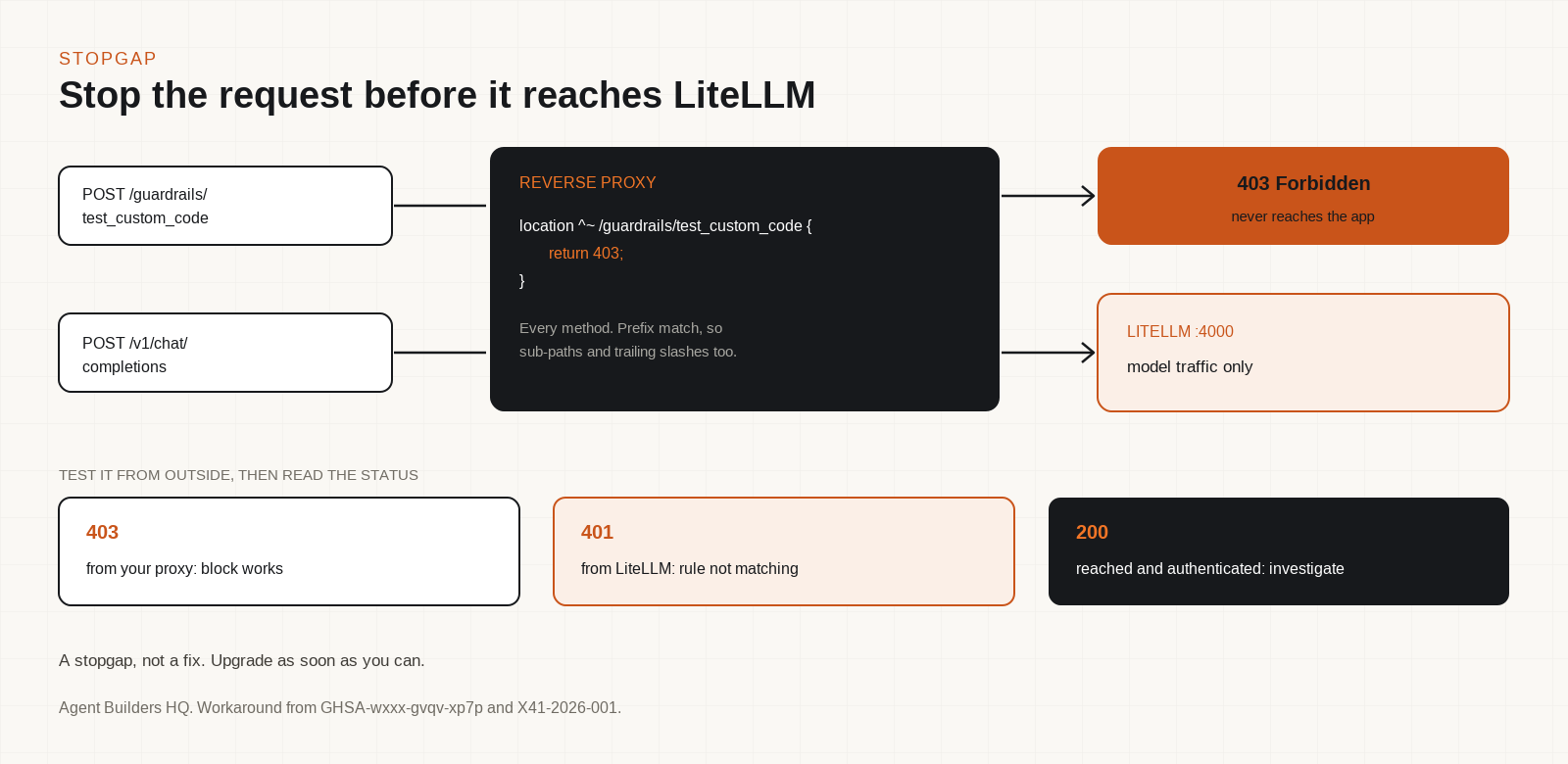
Both the GitHub advisory and X41 give the same workaround: block the endpoint at your reverse proxy or API gateway. You lose the ability to test guardrails through the API until you upgrade, which is a small price.
Block it for every method, not only POST. A rule that allows GET still lets a misconfigured client or a method override through, and nobody needs this endpoint from outside while you are exposed. Then confirm it from outside: a request should get your proxy's 403, not a response from LiteLLM.
While you are in the proxy config, restrict the admin surface. X41 recommends keeping the management interface off untrusted networks with firewall or VPC rules. If apps only need the model API, expose only that path to them and put admin and UI routes behind a VPN or an internal-only listener.
# ^~ makes this prefix match win over regex locations,
# and also covers trailing-slash and sub-path variants.
location ^~ /guardrails/test_custom_code {
    return 403;
}curl -s -o /dev/null -w "%{http_code}\n" -X POST https://llm.example.com/guardrails/test_custom_codeTip
If you run Kubernetes ingress, Envoy, Traefik or a cloud load balancer instead of Nginx, write the equivalent path rule there. Test it with the curl above; a 401 from LiteLLM means the request still reached the app.
Rotate the keys the gateway could read
Patching stops new exploitation. It does not un-leak anything taken before.
If the gateway ran a vulnerable version with the management API reachable, or with a master key that was weak, default or widely shared, treat its secrets as exposed. Zenity's observed payloads were built to dump exactly the environment variables you would care about.
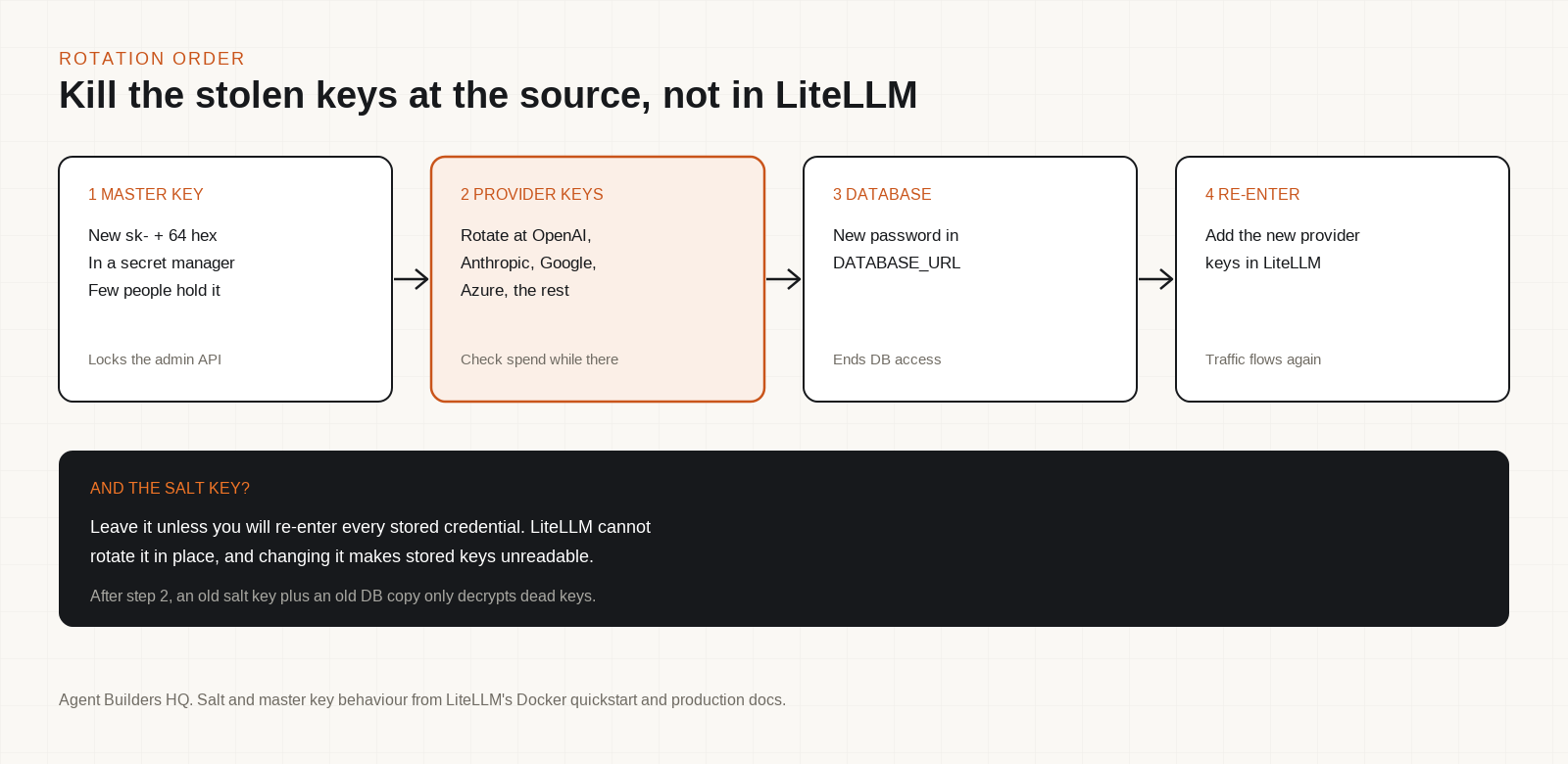
Rotate the master key to a long random value starting with sk-, store it in a secret manager, and limit who has it. Rotate the provider API keys at OpenAI, Anthropic, Google, Azure and the rest, and check their usage dashboards for spend you cannot explain. Rotate the database password in DATABASE_URL.
The salt key needs care. LiteLLM's docs say it has no in-place rotation and that changing it makes every stored credential unreadable until you re-enter it. Do not change it blindly. If it may have been exposed along with the database, the safe order is: rotate the provider keys themselves at each provider, then re-enter them in LiteLLM. An attacker with the old salt key and an old database copy then only has dead keys.
Going forward, give the gateway separate provider keys per environment, set spend limits at the provider where you can, and revoke keys you no longer use.
echo "sk-$(openssl rand -hex 32)"Run the proxy with less privilege
Non-root, no capabilities, no privilege escalation, a read-only filesystem and no Docker socket.
LiteLLM's production docs include a Kubernetes example that sets LITELLM_NON_ROOT=true with runAsNonRoot, runAsUser 101, readOnlyRootFilesystem and all capabilities dropped. The docs note that a read-only root filesystem needs writable paths for migrations, the UI and caches, and list environment variables to point them elsewhere (LITELLM_MIGRATION_DIR, LITELLM_UI_PATH, LITELLM_ASSETS_PATH, PRISMA_BINARY_CACHE_DIR and XDG_CACHE_HOME). Follow that example rather than inventing your own.
For plain Docker or Compose, X41's advice is to run the container as an unprivileged user. The compose example below shows the shape. The user ID and writable paths depend on the image you use, so test it in staging first: the usual failure is a Permission denied error on startup, which means a path needs a tmpfs or volume.
Never give the gateway the Docker socket, host directories or a privileged flag. Those turn a container compromise into a host compromise.
env:
  - name: LITELLM_NON_ROOT
    value: "true"
securityContext:
  runAsNonRoot: true
  runAsUser: 101
  allowPrivilegeEscalation: false
  readOnlyRootFilesystem: true
  capabilities:
    drop:
- ALLCheck whether you were hit
Look for requests to the endpoint, failed admin logins, odd processes, outbound connections and provider spend.
Start with your reverse proxy or load balancer logs, going back to at least mid-April 2026: any request to /guardrails/test_custom_code that your own admins did not make is worth a look. Bursts of 401 responses on admin routes suggest key guessing. Compare source addresses with the ones Zenity published if you want a quick first match, but do not treat an empty match as a clean bill of health.
Then look past the gateway: unexpected child processes or shells in the container, outbound connections to addresses that are not model providers, new or changed files in the image, new virtual keys or admin users in LiteLLM's database, and provider usage that does not match your traffic.
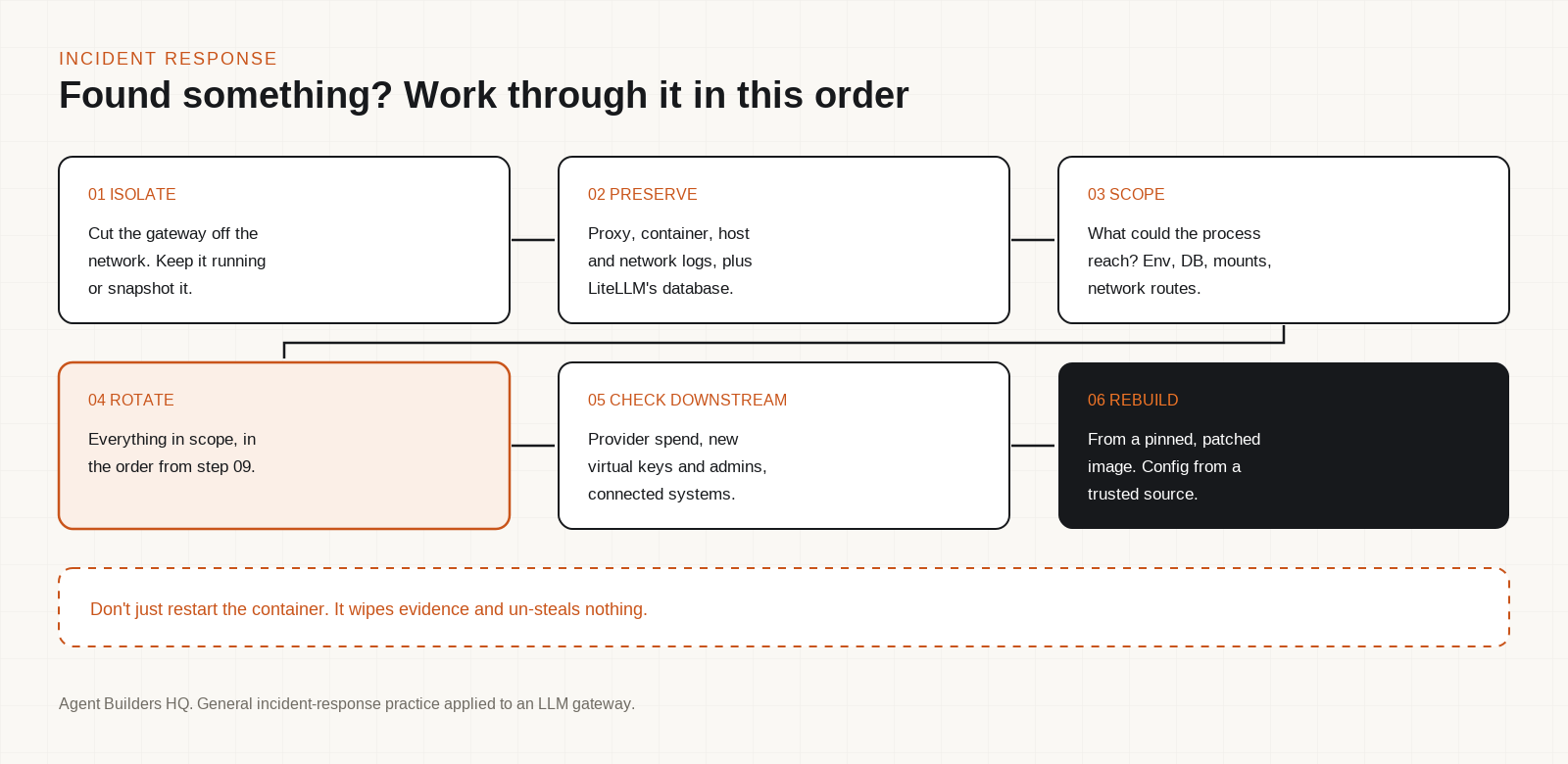
If you find signs of compromise, do not just restart the container. Isolate it and keep its logs, work out which credentials and systems the process could reach, rotate those (step 09), check provider spend and connected systems, then rebuild from a pinned, patched image and restore configuration from a trusted source.
grep -F "/guardrails/test_custom_code" /var/log/nginx/access.logzgrep -F "/guardrails/test_custom_code" /var/log/nginx/access.log*docker top CONTAINER_NAMETip
A match in the logs is a lead, not proof of compromise. A 403 from your proxy or a 401 from LiteLLM means the request was refused; a 200 on that path from an address you do not recognise is the one to chase.
Which severity score to quote
| Source | Score |
|---|---|
| CVE record (MITRE, and Red Hat's assessment) | CVSS v3.1 8.8 High: AV:N/AC:L/PR:L/UI:N/S:U/C:H/I:H/A:H |
| X41 D-Sec advisory | CVSS v4.0 8.7: AV:N/AC:L/AT:N/PR:L/UI:N/VC:H/VI:H/VA:H |
| GitHub reviewed advisory | CVSS v4.0 7.5: rates attack complexity High and privileges required High |
You will see three different numbers for this CVE. They are all correct for what they measure, so always quote the score with its version and its source.
A hardened Docker Compose service, for reference
services:
  litellm:
    image: docker.litellm.ai/berriai/litellm:<pinned-release-tag>
    env_file: ./litellm.env            # LITELLM_MASTER_KEY, LITELLM_SALT_KEY, provider keys
    ports:
      - "127.0.0.1:4000:4000"          # publish to localhost; let your reverse proxy front it
    user: "101:101"
    read_only: true
    tmpfs:
      - /tmp
    security_opt:
      - no-new-privileges:true
    cap_drop:
      - ALL
The shape of a less-privileged Compose deployment, to go with step 10. Replace the tag with the current release you have tested, and expect to add tmpfs or volume paths if the proxy reports Permission denied on startup. Keep the keys in an env file or secret store outside the repository.
Lessons for anyone running AI infrastructure
- An LLM gateway is privileged infrastructure. It holds more credentials than most of the apps that call it.
- Do not treat a language-level sandbox as a security boundary. Deny-lists on source text fail against a language as dynamic as Python. Even RestrictedPython should sit inside OS-level isolation, not replace it.
- If a feature runs user-supplied code, run that code in a separate process or container with no secrets and no network, not inside the process that holds the keys.
- Admin keys need the same care as cloud root credentials: long, random, never default, in a secret manager, held by few people.
- Least privilege applies to the container too: non-root, no capabilities, read-only filesystem, no host mounts.
- KEV listings lag. Public exploit details were out seven months before this one was listed. Patch on the advisory, not on the listing.
LiteLLM response checklist
- Every LiteLLM deployment is listed, including staging and personal experiments.
- Each runs a current release of at least 1.83.11, pinned by tag or digest.
- Until then, /guardrails/test_custom_code is blocked for every method at the reverse proxy, and the block is tested from outside.
- Admin API and UI are not reachable from untrusted networks.
- The master key is long, random, not a tutorial default, stored in a secret manager and rotated if exposure is possible.
- Provider API keys and the database password are rotated where exposure is possible, and provider spend has been reviewed.
- Stored provider credentials are re-entered after rotation; the salt key is not changed blindly.
- The proxy runs non-root, with capabilities dropped, no privilege escalation and no Docker socket or host mounts.
- Logs since April 2026 have been checked for requests to the endpoint and for admin key guessing.
CVE-2026-40217 is a sandbox that checked what code said instead of what it did, sitting in the one process that holds all your model keys. The admin-key requirement narrows who can use it but does not make it safe, because attackers are guessing those keys and CISA has evidence of exploitation. Upgrade to a current pinned release today, or block the endpoint until you can. Then rotate anything the gateway could read if it was exposed, and run it non-root behind a network boundary. The bigger lesson is that securing AI is not only about prompts and models. The plumbing that connects them to your business needs the same care.
Frequently asked questions
Can an unauthenticated attacker exploit CVE-2026-40217?+
Not in a default configuration. The GitHub advisory says reaching the endpoint requires a proxy-admin credential. But the admin key is often weak, a tutorial default or widely shared, and honeypots have seen attackers guessing it, so an exposed gateway with a guessable key is effectively open.
Which LiteLLM versions are affected, and which version fixes it?+
The GitHub advisory lists versions from 1.81.8 up to but not including 1.83.10 as affected. Its structured data names 1.83.10 as patched, but its written fix says upgrade to 1.83.11 or later. Follow the written instruction, and preferably move to a current release pinned by tag or digest.
Is the vulnerability being exploited in the wild?+
CISA added it to the Known Exploited Vulnerabilities catalog on 18 November 2026, which requires evidence of exploitation. Zenity Labs' honeypots recorded 569 POST requests to the endpoint between 15 April and 24 May 2026, including working sandbox-escape payloads. No public source names a specific victim, and ransomware use is listed as unknown.
Does running LiteLLM as non-root fix the vulnerability?+
No. Non-root reduces what an attacker can change and makes persistence and container escape harder, but the process can still read its own environment and database credentials. You still need to patch or block the endpoint.
Can I just block the endpoint instead of upgrading?+
As a temporary measure, yes. Both the GitHub advisory and X41 recommend blocking /guardrails/test_custom_code at a reverse proxy if you cannot upgrade immediately. Block every method, test it from outside, and still upgrade.
Does the 2 December CISA deadline apply to my company?+
The deadline is binding for US federal civilian agencies under the CISA directive cited in the catalog entry. It is not a legal requirement for private companies or organisations outside the US, but the listing is a strong signal to prioritise the fix.
Should I rotate my LiteLLM salt key?+
Not blindly. LiteLLM's docs say the salt key cannot be rotated in place and changing it makes stored credentials unreadable. If the gateway may have been compromised, rotate the provider keys themselves at each provider and re-enter them, so anything decrypted with the old salt key is already dead.