Microsoft agent-framework PyPI Compromise: How a .pth Startup Hook Stole Credentials Without an Import
Two malicious releases of Microsoft's agent-framework package (1.26.1 and 1.26.2) hid a credential stealer in a Python .pth file, so it ran every time Python started, even if nothing imported the framework. How the hook works, what it collected, what is known about the root cause, and how to check, clean up and rotate without setting it off again.
On 17 November 2026, two malicious versions of Microsoft's agent-framework package, 1.26.1 and 1.26.2, were published to PyPI under the real project name. Both carried a credential stealer dressed up as runtime telemetry. The part that matters most for anyone triaging it: the stealer was launched from a .pth file in site-packages, and Python executes those at interpreter startup. You did not need to import agent_framework for it to run. Any Python process in that environment would do, including pytest, a build script, or pip itself. PyPI quarantined both versions within about 45 minutes, but lockfiles, caches, mirrors and container images built in that window can still hold them. This post explains how the hook works, what the stealer went after, what is and is not known about how the releases got published, and how to check and clean up without triggering it again. The last clean version is 1.26.0.
System requirements
Who this is for
Anyone who installs agent-framework, and anyone running Python in CI
AI engineers, Python developers, DevSecOps and cloud security teams. Steps 06 to 09 are the incident response part. Step 10 applies to every Python dependency, not only this one.
Affected versions
agent-framework 1.26.1 and 1.26.2 only
GitHub advisory GHSA-764m-3ppc-5m73 lists exactly these two as malicious, with no patched version because the fix is to not have them. 1.26.0 (12 November 2026) is the last clean release and was still the latest on PyPI when we checked on 23 November.
Exposure window
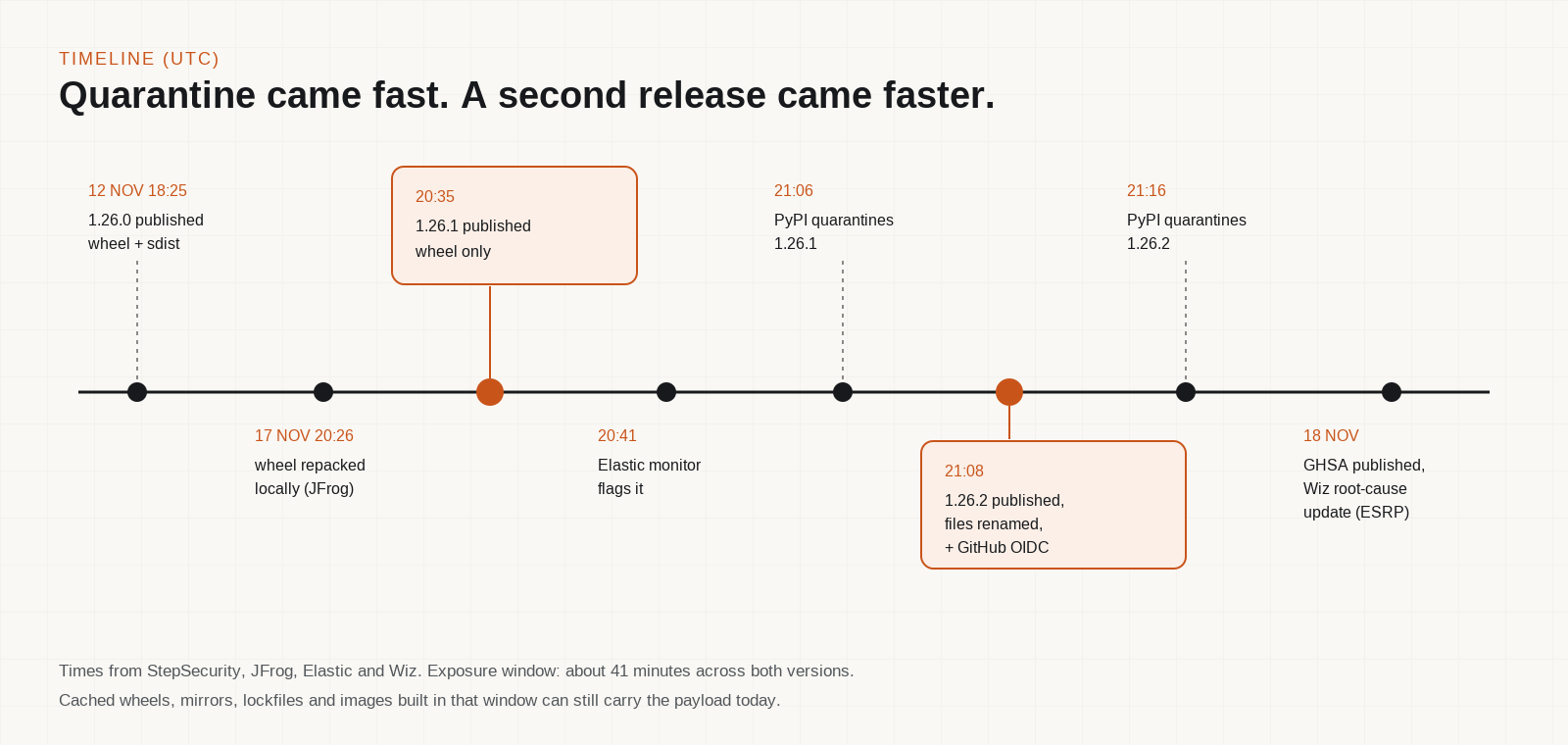
17 Nov 2026, 20:35 to 21:16 UTC on PyPI
That is when the versions could be freshly resolved from PyPI. Anything that cached or vendored them (pip and uv caches, internal mirrors, Docker images, CI caches) can still install them after that.
Primary sources
Wiz, StepSecurity, JFrog, Elastic, CSA, the GitHub advisory and Python's docs
Wiz's post (17 Nov, updated 18 Nov 14:00 UTC), StepSecurity, JFrog and Elastic (18 Nov), the Cloud Security Alliance research note (19 Nov), GHSA-764m-3ppc-5m73 and the Python 3.15 site module docs. We read all of them on 23 November 2026.
What happened, in one paragraph
Two wheel-only releases with a .pth startup hook, live on PyPI for 41 minutes between them.
Microsoft Agent Framework is Microsoft's open-source framework for building AI agents and multi-agent workflows in Python and .NET. Its Python package, agent-framework, gets roughly 40,000 downloads a week (Wiz and JFrog) or about 196,000 a month (Elastic). The two numbers measure different windows and roughly agree.
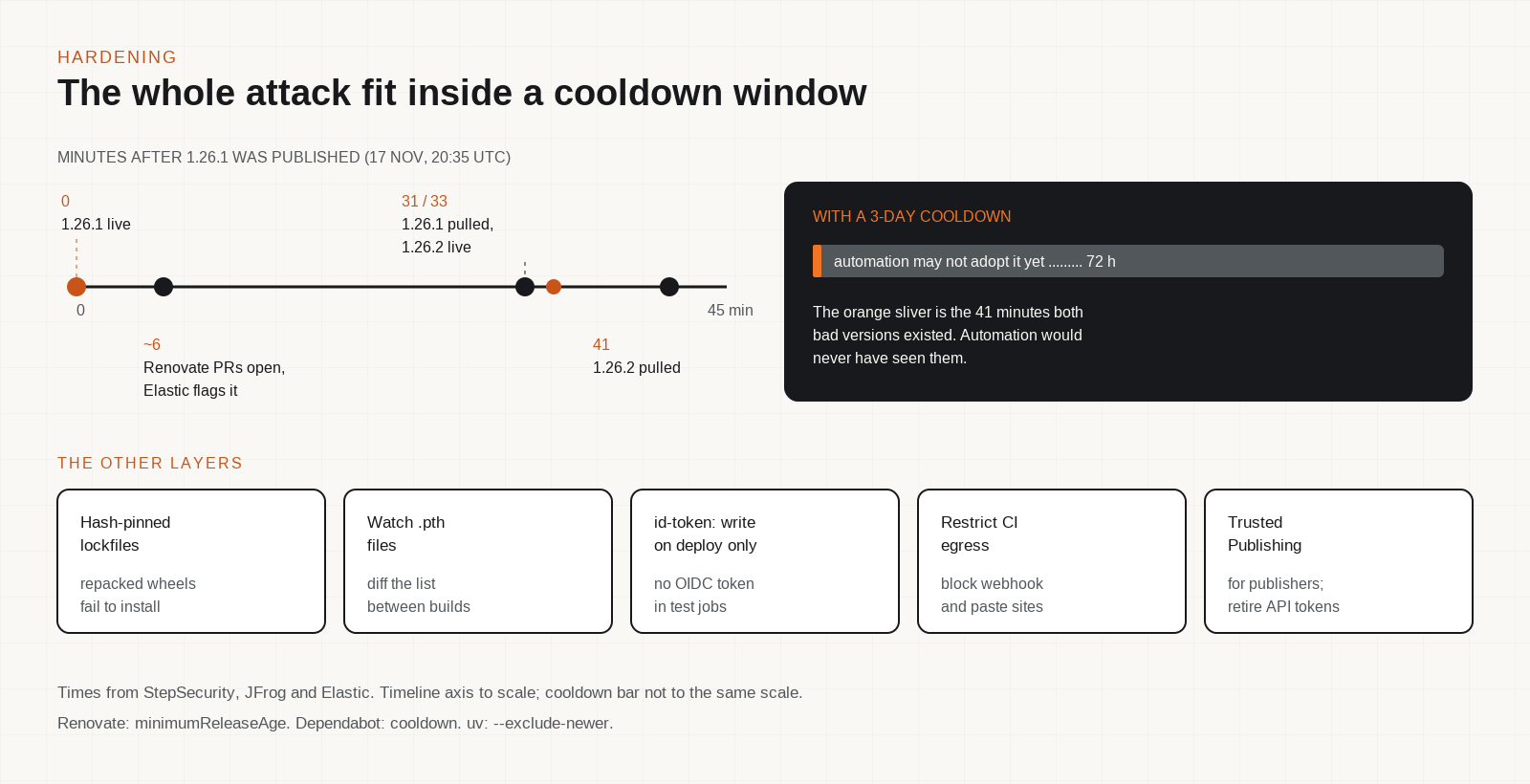
At 20:35 UTC on 17 November, version 1.26.1 appeared on PyPI. It was a wheel only, where the clean 1.26.0 had shipped a wheel and a source distribution. Elastic's supply-chain monitor flagged it at 20:41, six minutes later. PyPI quarantined it at 21:06. Two minutes after that, at 21:08, version 1.26.2 appeared with the same stealer under new file names and a new GitHub Actions feature. PyPI quarantined that one at 21:16.
That second release is the lesson in miniature. Pulling a bad version does not take away whatever let the attacker publish it. JFrog put it plainly: quarantine does not revoke the publishing credential.
Why a .pth file runs code without an import
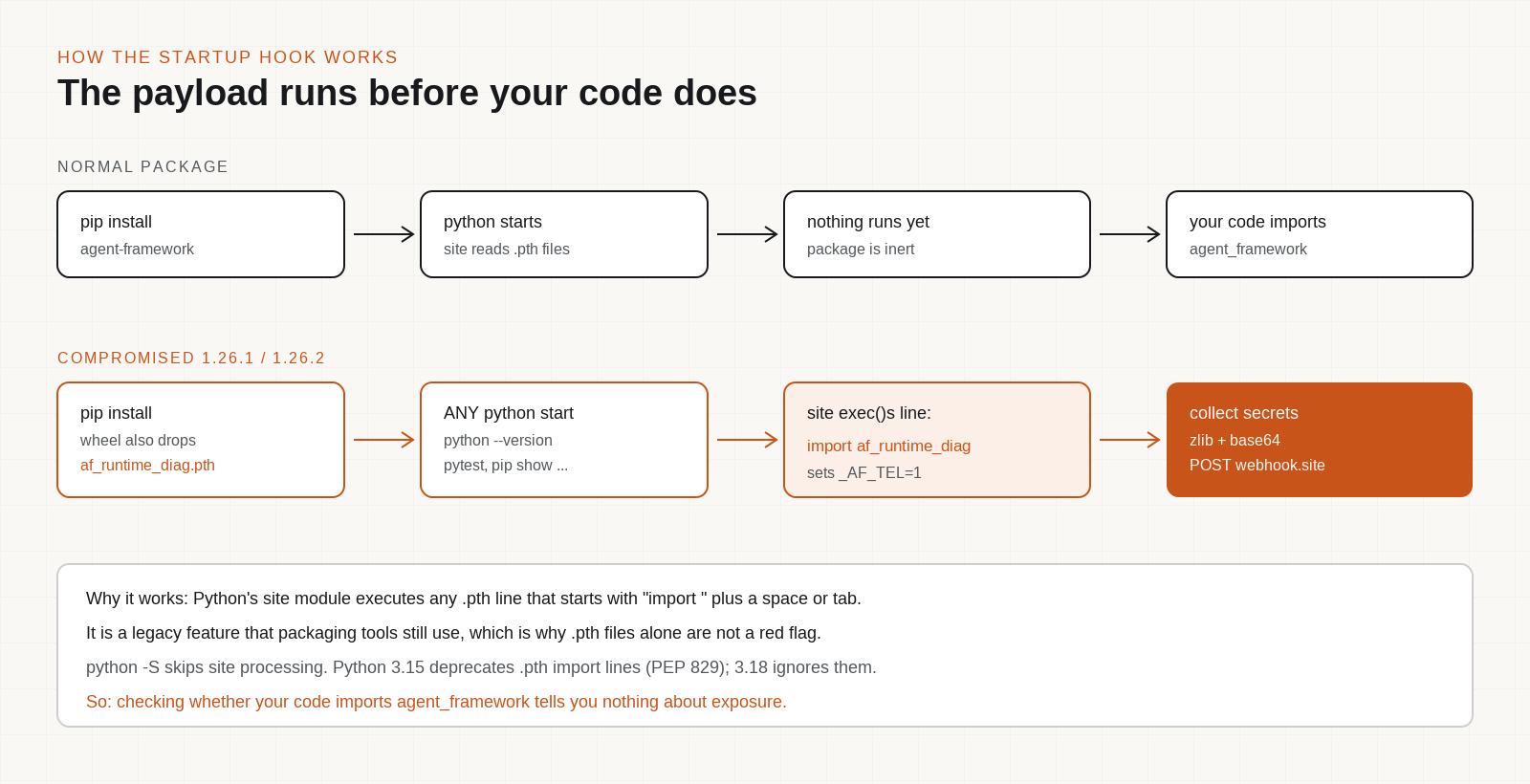
Python's site module executes any .pth line that starts with "import" followed by a space or tab.
When Python starts, it imports the site module, which adds site-packages to the module search path and then reads every .pth file it finds there. Most lines in a .pth file are just extra directories to add to the path. But Python's documentation says that, for backward compatibility, "lines starting with import (followed by space or tab) are executed with exec()". Those lines run on every interpreter start, unless Python is launched with -S, which turns off site processing entirely.
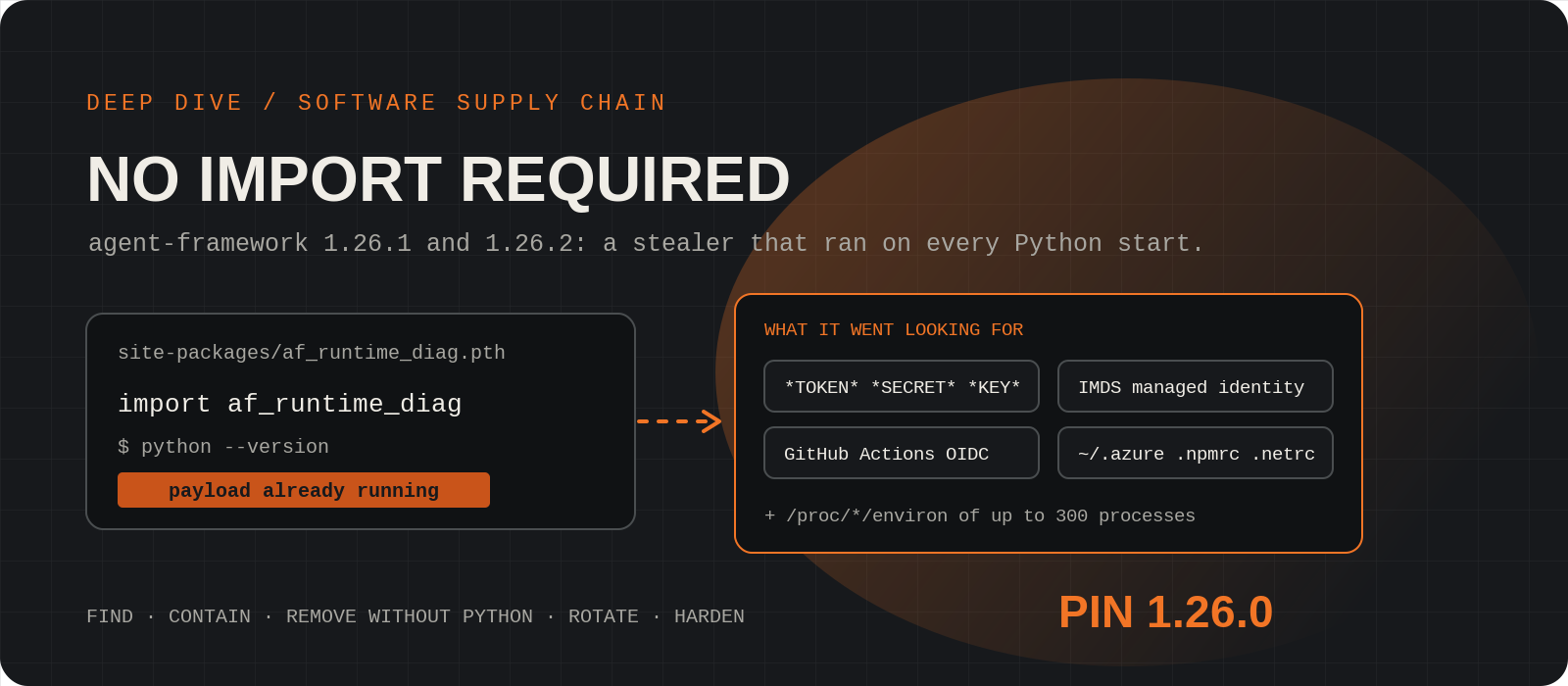
Version 1.26.1 put a 28-byte file called agent_framework_meta.pth at the root of the wheel, containing one line: import agent_framework_meta. That module's __init__.py had a call appended to it that started the stealer in agent_framework_meta/_telemetry.py. Version 1.26.2 restored that __init__.py to the clean 1.26.0 file and used a new pair instead: af_runtime_diag.pth (23 bytes, import af_runtime_diag) and a top-level af_runtime_diag.py.
So the stealer ran when Python started, not when your code used the framework. python --version, pytest, a pre-commit hook, an unrelated automation script, and pip show agent-framework would all trigger it in an environment where the package was installed. Installing alone did not run it; the next Python start did. Wiz says it forked into a detached session, or fell back to a background thread where fork is not available, which includes Windows. It set _AF_TEL=1 in the environment so child processes would not run it twice.
.pth import lines are not malicious by themselves. Packaging tools, editable installs and coverage tooling use them, so do not delete every .pth file you find. Python 3.15 has deprecated them (PEP 829 replaces them with .start files that name an entry point), Python 3.18 and 3.19 are expected to ignore them silently, and later versions will warn. Until then, they are a quiet place to put code.
# 1.26.1: site-packages/agent_framework_meta.pth
import agent_framework_meta

# 1.26.2: site-packages/af_runtime_diag.pth
import af_runtime_diagWhat the stealer went after
Environment variables, other processes' environments, credential files, Azure managed identities and CI tokens.
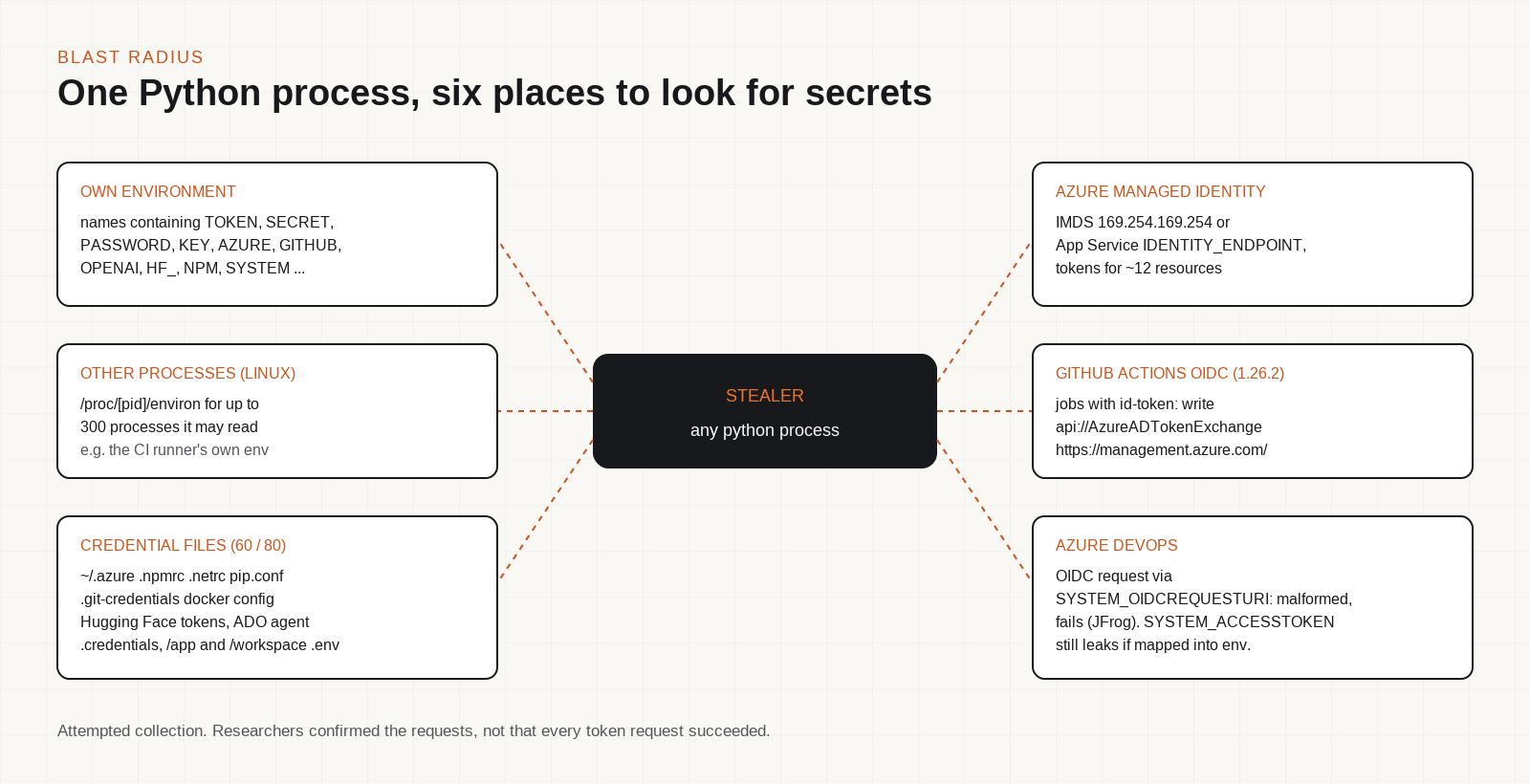
Environment variables: it kept any variable whose name contained words such as TOKEN, SECRET, PASSWORD, KEY, AZURE, AWS, GITHUB, OPENAI, HF_, FOUNDRY, NPM, PIP, NUGET, SYSTEM, BUILD or AGENT. 1.26.2 added ACTIONS, OIDC, RUNNER and ARM_. Broad matching is the point: KEY alone catches ANTHROPIC_API_KEY, GEMINI_API_KEY and most custom names without the attacker knowing them in advance.
Other processes: on Linux it read /proc/[pid]/environ for up to 300 processes, wherever permissions allowed. On a CI runner that can include the runner agent's own environment, not only the Python step's.
Credential files: up to 60 files in 1.26.1 and 80 in 1.26.2, matched by about 35 glob patterns. The list included ~/.azure (Azure CLI token caches), pip.conf, .npmrc, .netrc, .git-credentials, Docker's config.json, Hugging Face tokens, Azure AI Foundry configs, Azure DevOps agent .credentials files, and .env and JSON files under /app and /workspace. 1.26.2 added GitHub-hosted runner paths under /home/runner/work/_temp and /home/runner/.azure.
Azure managed identity: it asked the Instance Metadata Service at 169.254.169.254, or the App Service IDENTITY_ENDPOINT, for tokens covering about a dozen resources (Wiz, JFrog and Elastic all say 12), including Azure Resource Manager, Microsoft Graph, Key Vault, Storage, Azure AI services, Container Registry and Azure DevOps. A token from a managed identity carries whatever roles that identity has. Wiz says these tokens can be valid for up to 24 hours.
CI identities: 1.26.2 added GitHub Actions. In a job with id-token: write, it requested OIDC tokens for api://AzureADTokenExchange and https://management.azure.com/, the audiences used for workload identity federation into Azure. Both versions also tried to get an Azure DevOps OIDC token through SYSTEM_OIDCREQUESTURI. JFrog found that request was malformed (it omits the required serviceConnectionId) and would get an HTTP 400 from real Azure DevOps. SYSTEM_ACCESSTOKEN still leaked through the environment wherever a pipeline mapped it into the step.
How the data left, and how much got out
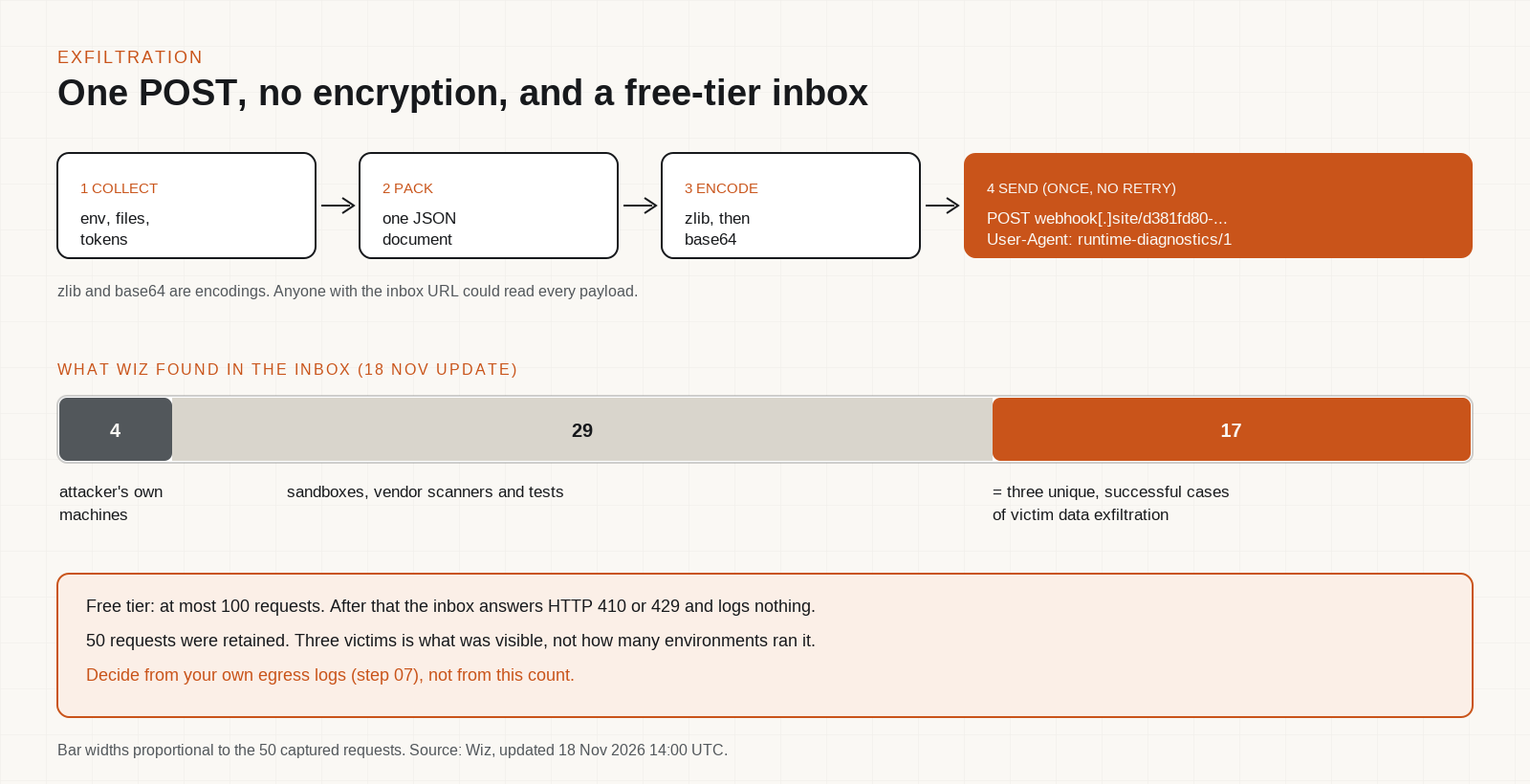
One compressed, base64-encoded POST to a free webhook.site inbox. Wiz found three successful victim cases in what was retained.
The stealer packed everything into one JSON document, compressed it with zlib, base64-encoded it and sent it in a single HTTPS POST to a hardcoded webhook.site URL. There was no fallback channel; failures were silently ignored. The User-Agent was af-runtime-diagnostics/1 in 1.26.1 and runtime-diagnostics/1 in 1.26.2, chosen to look like SDK telemetry. Compression and base64 are not encryption. Anyone holding the inbox URL could read the contents.
The inbox was publicly reachable, which let Wiz look inside. It was on webhook.site's free tier, which accepts at most 100 requests and then answers HTTP 410 or 429 without logging anything. Wiz found 50 captured requests: 4 from the attacker's own machines and attack process, 29 from sandboxes, vendor scanners and tests, and 17 that represented three unique, successful cases of victim data being exfiltrated. JFrog saw HTTP 429 "Request limit exceeded" when it checked.
Read those numbers carefully. Three is the number of victims identifiable in the retained requests, not the number of exposed environments. Hosts that ran the payload after the cap was hit sent their data into a rejection, which is good for them, but hosts behind an egress block or a crashed request would also not appear. Use your own logs (step 07), not Wiz's count, to decide whether you were hit.
What is known about the root cause
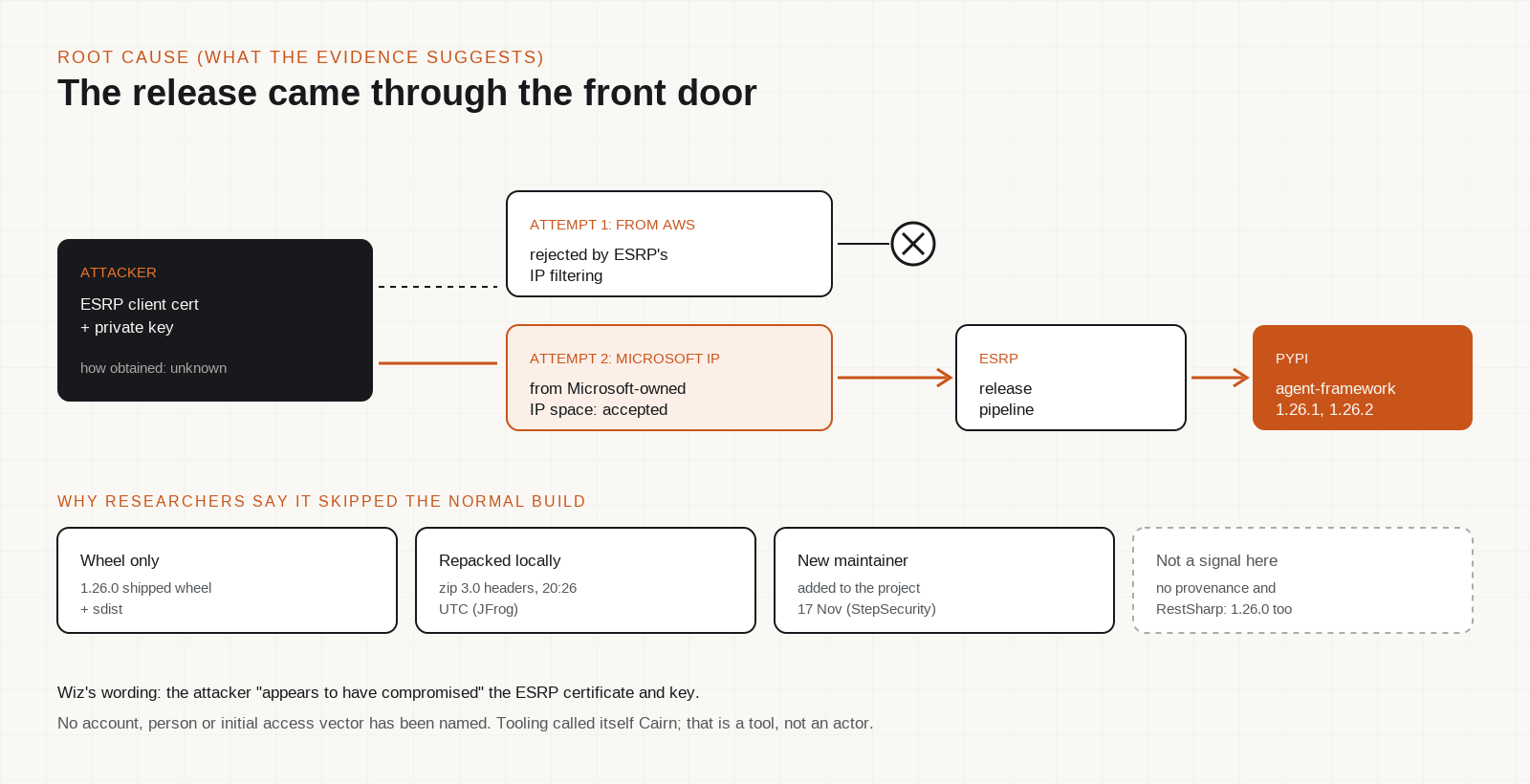
Evidence points to stolen Microsoft release-pipeline credentials. How they were obtained is not known.
In its 18 November update, Wiz reported that the attacker "appears to have compromised a client certificate and private key" for Microsoft's Engineering System Release Pipeline (ESRP), the internal system that signs and publishes Microsoft packages. The attacker's tooling reported its progress to the same public webhook it used for exfiltration, which is how Wiz could see part of the operation. The first publish attempt, from AWS, was rejected by ESRP's IP filtering. A second attempt from Microsoft-owned IP space succeeded. Wiz says how the credentials were obtained is not yet known.
The packages themselves back up that they did not come from the normal build. JFrog found zip 3.0 headers showing the wheel was repacked locally at 20:26 UTC, nine minutes before upload, while the WHEEL metadata still said it was generated by flit. StepSecurity found the uploads came through RestSharp/106.13.0.0, the same client recorded for the clean 1.26.0, and reports that a new maintainer account was added to the PyPI project on 17 November. Both malicious releases were wheel only.
Two things that do not tell you much: provenance and attribution. PyPI shows no provenance attestation for the malicious wheels, but it shows none for 1.26.0 either, and 1.26.0 was not uploaded through Trusted Publishing. A missing attestation could not have told you anything here. On attribution, Wiz says the tooling called itself Cairn, an open-source AI penetration-testing framework. That is the name of a tool, not an operator. Wiz, JFrog and the GitHub advisory all say they have not attributed the attack to a known group, and StepSecurity says the evidence does not establish the initial access vector, the credential used or the uploader's identity.
Wiz also notes that another Microsoft Python package, durabletask, was compromised earlier in 2026 after its PyPI token was stolen. Wiz has not linked the two incidents, and neither do we.
Tip
If you write about this incident, say "evidence suggests" and "has not been established". Naming a person, an account or a token as the cause goes further than any of the published research.
Check whether you installed it, without starting Python
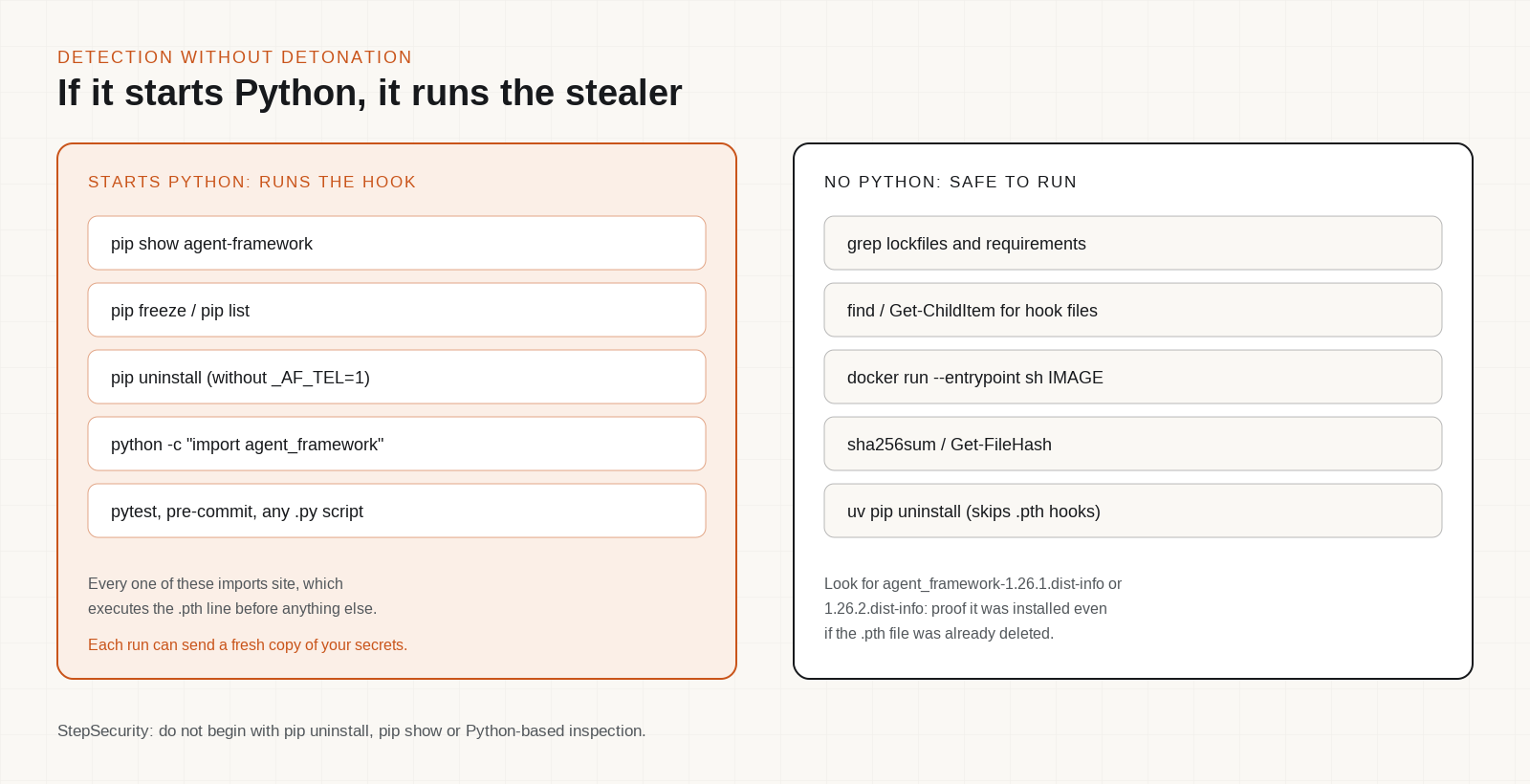
Search lockfiles, the filesystem and images with shell tools. pip show starts Python, which runs the hook.
This is where the usual advice is wrong. Running pip show agent-framework or pip freeze starts a Python interpreter in that environment. If the bad .pth file is there, you have just run the stealer again. StepSecurity's advice is not to begin with pip uninstall, pip show or any Python-based inspection. Use grep, find, PowerShell and your image tooling instead.
Start with dependency files: requirements*.txt, pyproject.toml, poetry.lock, uv.lock, Pipfile.lock and pylock.toml. In uv.lock and poetry.lock the name and version sit on separate lines, so print the line after the name. Then check CI logs from 17 November, Renovate or Dependabot pull requests opened that evening (JFrog saw Renovate open PRs within six minutes of 1.26.1 landing), internal mirrors and container images built since.
Then search the filesystem for the hook files and for the installed version's metadata folder. A folder named agent_framework-1.26.1.dist-info or agent_framework-1.26.2.dist-info means that version was installed there, even if someone already deleted the .pth file. Only flag _telemetry.py when it sits inside an agent_framework_meta folder; plenty of legitimate packages have a file with that name.
For container images, run a shell instead of the default entrypoint, so the image's Python never starts.
grep -rnE "agent[-_]framework[^0-9]*1\.26\.[12]([^0-9]|$)" --include="*.txt" --include="*.toml" --include="*.cfg" --include="Pipfile.lock" .grep -rn -A1 'name = "agent-framework"' --include="uv.lock" --include="poetry.lock" --include="pylock*.toml" .find / \( -name 'agent_framework_meta.pth' -o -name 'af_runtime_diag.pth' -o -name 'af_runtime_diag.py' -o -path '*agent_framework_meta/_telemetry.py' -o -name 'agent_framework-1.26.[12].dist-info' \) 2>/dev/nullGet-ChildItem -Path C:\ -Recurse -Force -File -ErrorAction SilentlyContinue -Include agent_framework_meta.pth,af_runtime_diag.pth,af_runtime_diag.py,_telemetry.py | Where-Object { $_.Name -ne '_telemetry.py' -or $_.DirectoryName -like '*agent_framework_meta' } | Select-Object FullNameGet-ChildItem -Path C:\ -Recurse -Force -Directory -ErrorAction SilentlyContinue -Filter 'agent_framework-1.26.*.dist-info' | Select-Object FullNamedocker run --rm --entrypoint sh IMAGE_NAME -c "find / \( -name 'agent_framework_meta.pth' -o -name 'af_runtime_diag.pth' -o -name 'agent_framework-1.26.[12].dist-info' \) 2>/dev/null"sha256sum PATH_TO_FILE
Get-FileHash PATH_TO_FILE -Algorithm SHA256Tip
If you find nothing, also clear the pip and uv caches and check your mirror before closing the ticket. A cached 1.26.1 wheel will install the stealer the next time a build resolves it offline.
Check whether it ran and whether data left
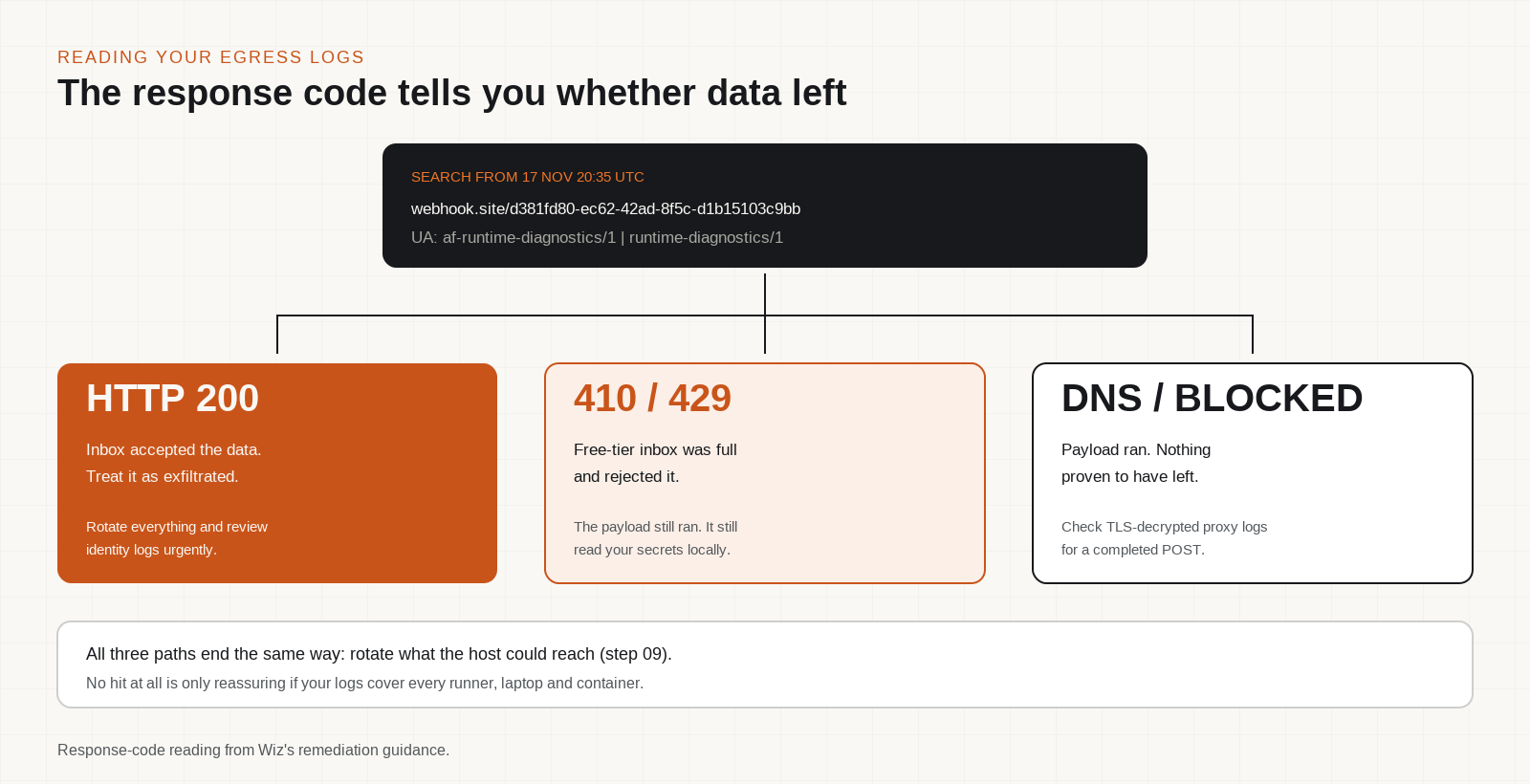
Look for the webhook URL, the User-Agents and the response code in proxy, DNS and firewall logs.
Search egress logs from 20:35 UTC on 17 November onward. The strongest single indicator is the inbox path d381fd80-ec62-42ad-8f5c-d1b15103c9bb on webhook.site, usually with the query string ?t=telemetry. If your proxy decrypts TLS, the User-Agents af-runtime-diagnostics/1 and runtime-diagnostics/1 are also specific.
The response code is what tells you whether data was accepted. Wiz's guidance: HTTP 200 means that host's data was received. 410 or 429 means the inbox had hit its free-tier cap and rejected it. A DNS lookup for webhook.site or a blocked connection is evidence the payload ran, which is reason enough to rotate (step 09), but not proof that anything left.
On a host, a process running with _AF_TEL=1 in its environment is another sign the payload executed in that process tree.
grep -F "d381fd80-ec62-42ad-8f5c-d1b15103c9bb" /var/log/squid/access.log*grep -rE "(af-)?runtime-diagnostics/1" /var/log/sudo grep -l "_AF_TEL=1" /proc/[0-9]*/environ 2>/dev/nullTip
Swap the log paths for wherever your proxy, DNS resolver or cloud firewall writes. In a managed service, search the same strings in its log query tool.
Remove it without setting it off again
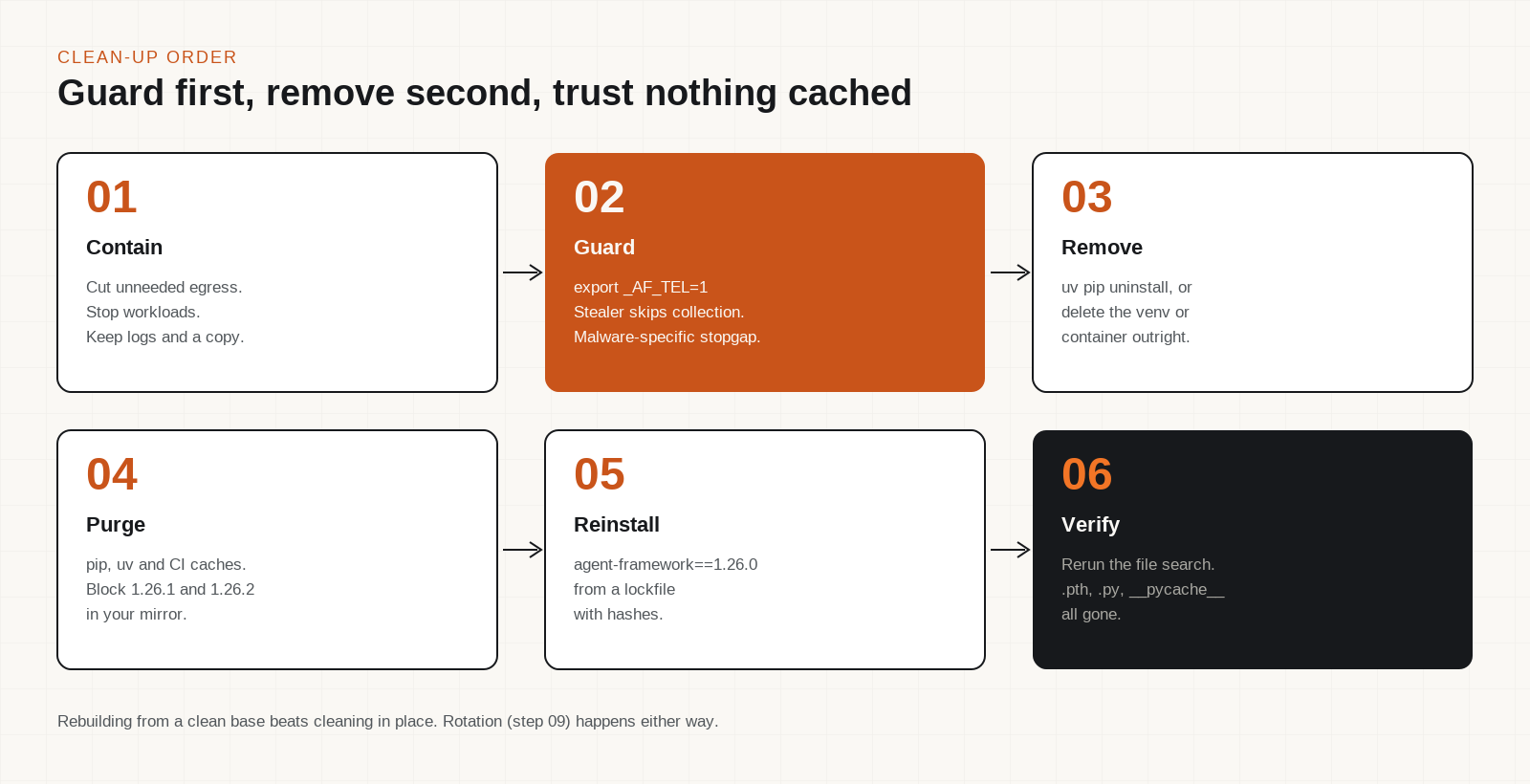
Contain, set _AF_TEL=1, remove with uv or rebuild from clean, and pin 1.26.0.
Contain first. Cut unnecessary network access from the affected machine or runner, stop dependent workloads where you can, and keep logs and a copy of the environment for investigation. Do not keep launching Python processes while you work out what to do.
JFrog's stopgap is to export _AF_TEL=1 before anything else. The stealer checks that variable and skips collection if it is set, so it blocks both versions. It is specific to this malware, not a general defence, and it only helps in shells where you set it.
Then remove the package with a tool that does not run Python's startup hooks. JFrog notes that uv does not execute .pth files during removal. Better still, throw the environment away: delete the virtualenv or rebuild the container from a trusted base, install from a lockfile pinned to 1.26.0 with hashes, and clear the pip, uv and CI caches so the bad wheel cannot come back. Block 1.26.1 and 1.26.2 in your internal mirror or artifact proxy.
After removal, run the step 06 search again to confirm the .pth file, the .py file and any __pycache__ copies are gone.
export _AF_TEL=1$env:_AF_TEL = "1"uv pip uninstall agent-framework && uv cache clean agent-frameworkuv pip install "agent-framework==1.26.0"export _AF_TEL=1
"$PY_BIN" -m pip uninstall -y agent-framework
"$PY_BIN" -m pip cache remove agent_framework
"$PY_BIN" -m pip install --no-cache-dir "agent-framework==1.26.0"Tip
In the pip sequence, PY_BIN is the affected environment's Python, for example .venv/bin/python. It still starts Python, which is why the guard has to be exported in the same shell first.
Rotate credentials and review cloud identities
Rotate everything the host and its processes could read, then check what issued tokens were used for.
Treat every secret reachable from an affected environment as exposed, not only the ones the agent app uses. That includes the CI runner's secrets, other processes' environments and every file in the step 03 list. Rotating a secret does not invalidate a token already issued from it, so rotation and log review are separate jobs.
For Azure, review Entra ID sign-in logs for the managed identities and service principals the host could use, Azure Resource Manager activity, Key Vault and Storage access, and federated identity credential activity, starting at 20:35 UTC on 17 November. Managed-identity and OIDC-exchanged tokens can stay valid for up to 24 hours, so look at the whole day after exposure. Recycle compute you cannot vouch for.
For GitHub Actions jobs that ran 1.26.2 with id-token: write, treat the OIDC tokens as exposed: review the Entra ID federated credentials that trust that repository, and rotate repository and organisation secrets the job could see. For Azure DevOps, rotate PATs and service connection credentials and review pipeline authentication logs.
Harden the next install
Cooldowns, hash-pinned lockfiles, watching for new .pth files, fewer secrets on build runners and controlled egress.
Add a dependency cooldown. Elastic flagged 1.26.1 in six minutes and PyPI pulled both versions within 45, but Renovate was already opening upgrade PRs inside those six minutes. A rule that holds new releases for a few days before automation can adopt them would have skipped this incident entirely. Renovate has minimumReleaseAge, Dependabot has a cooldown setting, and uv can resolve as of a fixed date with exclude-newer.
Pin with hashes. A version pin alone accepts whatever is published under that number. A lockfile with hashes means a rebuilt or repacked wheel fails to install. Flag wheel-only releases of packages that normally ship an sdist too, as CSA suggests; that was the first visible anomaly here.
Watch site-packages. A new .pth file containing an import line, from a package that did not ship one before, deserves a human look. Diff the list of .pth files between builds; it is a short list in most environments.
Give build runners less. Remove id-token: write from jobs that do not deploy, split build and deploy identities, prefer short-lived credentials over stored secrets, and restrict egress from runners to the registries and endpoints they need. Blocking webhook.site and similar paste and webhook services from CI costs little.
If you publish packages, use PyPI Trusted Publishing and publish attestations, retire long-lived API tokens, and audit who can add maintainers. Provenance only helps if consumers check it, and it does not protect a release pipeline whose own credentials are stolen, which is what the evidence here suggests.
permissions:
  contents: read          # workflow default: no id-token

jobs:
  test:
    runs-on: ubuntu-latest
    steps:
      - uses: actions/checkout@v4
      - run: uv sync --locked && uv run pytest

  deploy:
    needs: test
    runs-on: ubuntu-latest
    permissions:
      contents: read
      id-token: write     # only here, where Azure login happens
    steps:
      - uses: actions/checkout@v4
# azure/login and deploy stepsuv pip compile requirements.in --generate-hashes -o requirements.txtpip install --require-hashes -r requirements.txtuv pip compile requirements.in --exclude-newer 2026-11-16T00:00:00Z -o requirements.txtIndicators of compromise
| Indicator | Value |
|---|---|
| Malicious versions | agent-framework==1.26.1, agent-framework==1.26.2 (last clean: 1.26.0) |
| 1.26.1 files | agent_framework_meta.pth, agent_framework_meta/_telemetry.py (plus an appended call in agent_framework_meta/__init__.py) |
| 1.26.2 files | af_runtime_diag.pth, af_runtime_diag.py |
| 1.26.1 wheel SHA-256 | d27fa34414e6201d5e03e559ef634f020057554d7b3f4898dd5d7cd3e989e110 |
| 1.26.2 wheel SHA-256 | 3d20a8bc91351a9a16b6db243b848ceca0206b7a8623b02d2af553a9c9f7e0a9 |
| agent_framework_meta.pth SHA-256 | 21f28e8517a10ffe431f8d68f5875c85eca4001ae6d118322b0a41873998eb5e |
| agent_framework_meta/_telemetry.py SHA-256 | 39fa329f2a93f734b0bb8f5adb203ea3331d1ae479832a5015a54cb17aabd663 |
| af_runtime_diag.pth SHA-256 | 325e7e9f0ec94e41ad1a1b7a3f18a6b8b5bffece2e2b97b8d3369eb967452f93 |
| af_runtime_diag.py SHA-256 | 54d885b7d7161c9ed96489c66364c4bfbf635929166843bba10d97d46b5a2e1f |
| Exfiltration endpoint | hxxps://webhook[.]site/d381fd80-ec62-42ad-8f5c-d1b15103c9bb?t=telemetry |
| User-Agent | af-runtime-diagnostics/1 (1.26.1), runtime-diagnostics/1 (1.26.2) |
| Environment marker | _AF_TEL=1 |
| Uploader client | RestSharp/106.13.0.0 (also used for the clean 1.26.0, so not malicious on its own) |
From Wiz, StepSecurity and JFrog. Search for both versions' file names: the second release changed them on purpose.
What this says about AI framework dependencies
- An agent framework gets installed exactly where the valuable credentials are: next to model API keys, cloud identities, vector database passwords and deploy tokens. Classify AI development and build environments as privileged infrastructure.
- Exposure does not follow usage. A package you installed and never imported could still run code on every Python start. Inventory what is installed, not what is imported.
- Removing a malicious version is half the response. The other half is whatever let it be published, which in this case the package's consumers cannot see or fix.
- This was not the first AI-tooling package hit in 2026. CSA's note lists the LiteLLM PyPI package poisoned with a .pth-based stealer in March and a takeover of roughly 144 packages in the @mastra npm scope in June. The pattern is the AI stack's middleware, not any one vendor.
- Python is closing this door slowly. PEP 829 deprecates .pth import lines from 3.15, but most environments will run older interpreters for years.
agent-framework response checklist
- Lockfiles, CI logs, mirrors, caches and images have been searched for 1.26.1 and 1.26.2 without starting Python.
- Filesystems and images have been searched for all four hook file names and the 1.26.1 and 1.26.2 dist-info folders.
- Egress logs have been checked for the webhook path and both User-Agents, and the response codes noted.
- Affected environments were contained, then rebuilt or cleaned with _AF_TEL=1 set and uv or a fresh environment.
- agent-framework is pinned to 1.26.0 with hashes, and 1.26.1 and 1.26.2 are blocked in the mirror.
- Every secret readable from an affected host has been rotated, and Azure, GitHub and Azure DevOps logs reviewed from 20:35 UTC on 17 November.
- A dependency cooldown is in place for automated upgrades.
- id-token: write is limited to deploy jobs, and CI egress is restricted.
The malware here was ordinary. The delivery was not: a real package name, a release pushed through what looks like Microsoft's own pipeline credentials, and a .pth hook that made "we never import it" irrelevant. If you installed agent-framework between 20:35 and 21:16 UTC on 17 November, or built from a cache or mirror that did, assume the stealer ran, check your egress logs for a 200, and rotate what that machine could reach. Do the first check with grep, not pip. For everyone else, the cheap fix is a dependency cooldown: a few days' delay on new releases would have skipped this incident and most like it, and it costs almost nothing. We would add that before anything else on the step 10 list.
Frequently asked questions
Was I affected if I never imported agent_framework?+
Possibly. The stealer ran from a .pth file that Python executes at startup, so any Python process in an environment where 1.26.1 or 1.26.2 was installed could run it, whether or not your code imported the framework. What matters is whether the version was installed and Python was started afterwards.
Which versions are safe?+
1.26.0, published on 12 November 2026, is the last clean release and was still the latest on PyPI on 23 November. Only 1.26.1 and 1.26.2 were malicious. Earlier versions are not affected by this incident.
Can I just run pip uninstall agent-framework?+
Not as the first step. pip starts Python, which runs the hook again if the .pth file is still there. Set _AF_TEL=1 first and remove it with uv, or better, delete the environment and rebuild it from a lockfile pinned to 1.26.0.
Does this affect Windows and macOS, or only Linux?+
All three. The .pth hook works on any platform, and the stealer collected environment variables and credential files everywhere. Reading other processes' environments through /proc only works on Linux, and on Windows, which has no fork, it would have used its background-thread fallback.
Was Microsoft hacked?+
Evidence from Wiz suggests the attacker had a client certificate and private key for Microsoft's ESRP release pipeline and published from Microsoft-owned IP space. How those credentials were obtained has not been made public, and no researcher has named an account, person or initial access vector.
Is there a CVE?+
Not that we found. The incident is tracked as GitHub advisory GHSA-764m-3ppc-5m73, classed as malware (CWE-506), with 1.26.1 and 1.26.2 as the affected versions and no patched version.
If I rotate my secrets, am I done?+
No. Rotation stops future use of the stolen secrets, but tokens already issued from managed identities or OIDC exchange can stay valid for up to 24 hours. Review what those identities did after exposure, and rebuild the environment so the hook is gone.